Sadx FreeStyle
Tools
2026-11-07
25.25MB
1.5.0
Android
283
Screenshots
Introduction
Sadx FreeStyle is a powerful game-assistance tool. It features a highly user-friendly interface, with a navigation bar that allows users to get started quickly. The software provides access to key data statistics and a wide range of adjustable parameters, offering robust customization options. In-game, users can leverage the tool to fine-tune settings such as sensitivity and crosshair configuration, enhancing overall performance and giving players better control over their gameplay. It also boasts excellent compatibility, supporting a broad array of gaming hardware. The tool monitors game functions in real-time and receives regular updates—adding new features and addressing any shortcomings—to provide users with reliable, ongoing technical support.
Features:
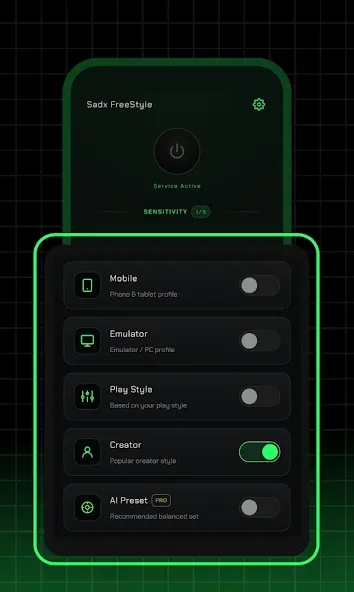
Reference Sensitivity Profiles
The app provides high, medium, and low sensitivity profiles, which you can review and manually enter into your game’s sensitivity settings menu. This allows you to quickly test various baseline configurations—a particularly useful feature for shooters like *Free Fire* that demand precise camera control. You retain full control over every value and can switch between profiles between matches to discover the settings that best suit your device and playstyle.
Static Crosshair Overlay
The app offers a simple, static crosshair overlay that serves as a visual aid on your game screen. It is non-interactive and does not control your aim or camera movement. You can enable it while practicing your aim, or disable it whenever you prefer a clean, unobstructed screen during actual gameplay.
Floating Performance Panel
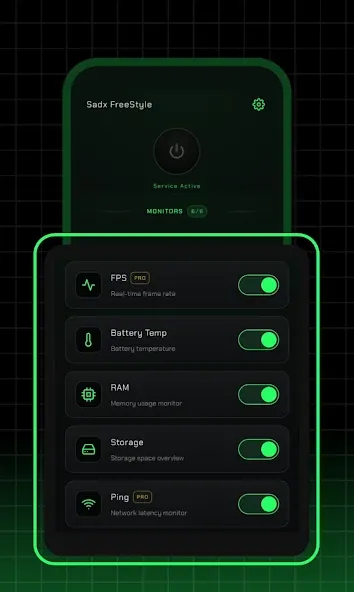
A streamlined floating panel displays essential performance metrics, such as frame rate, memory usage, and battery temperature. The layout is clear and easy to read, allowing you to quickly check your device's status between matches and decide whether to adjust settings or switch profiles. This eliminates the need to dig through multiple menus to monitor performance.
Lightweight and Compact Interface
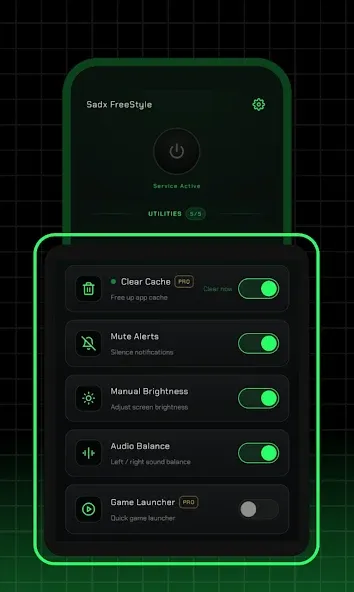
The interface is designed for minimalism, ensuring that panels do not take up excessive screen space. With clearly labeled controls and intuitive operation, new users can get up and running in no time. The design focuses on quick checks and simple toggles, making it perfectly suited for the mobile gaming experience.
Game-Independent and Transparent
The app operates independently of your games and does not modify any internal system files or game data. It performs no automated actions or tracking; every change is made entirely through your own manual input. Your gameplay remains unaffected, and you maintain full, user-driven control over your configurations at all times.
Highlights:
Visual Optimization: Adjust graphics settings to ensure smoother gameplay and reduce lag.
Aim Assist: Improve your aiming precision using built-in aim-assist tools.
Customizable Settings: Tailor the parameters to your personal preferences and needs.
User-Friendly Interface: Navigate the application with ease, thanks to its clean and intuitive design.
Regular Updates: Stay ahead of the competition with frequent updates that bring new features and improvements.
FAQS:
What is Sadx FreeStyle?
It is an Android game utility tool. Its publicly stated features include sensitivity recommendations, a simple overlay, and basic device information.
Which devices can run it?
Android phones are the most suitable devices; Android tablets can also be used, provided they meet the application's version and device requirements.
Does it function like the full version of the game?
No; it is a utility tool designed for configuration and overlay purposes, not a standalone game.
Advantages and disadvantages:
Pros
Generates reference values for high, medium, and low sensitivity settings.
Features a non-interactive crosshair overlay, eliminating the need to modify game files.
Provides real-time monitoring of frame rate, memory usage, and battery temperature at a glance.
Runs without requiring root access and is accessible via a floating panel.
Cons
Users must manually input the recommended sensitivity values into the game.
Conclusion:
If you need to quickly adjust settings and view statistics at a glance—without being distracted by a cluttered interface—this is the perfect choice for you. Download the Sadx FreeStyle APK today to get started and keep key information at your fingertips while you play.





-
Latest Updates
-
Featured Apps