Filmic Pro
Photography
2026-09-02
58.96MB
7.6.4
Android 5.1+
351
Screenshots
Introduction
Filmic Pro is a mobile camera application for Android devices, allowing users to capture high-quality photos and videos directly from their phones. The latest version introduces a quick action mode and motion slider, enabling users to quickly change camera settings. It also features dedicated focus and exposure modes for better scene capture. This application provides cinematic image processing tools, helping users capture a wider color gamut and enrich their videos.
Features:
Redesigned v7 interface
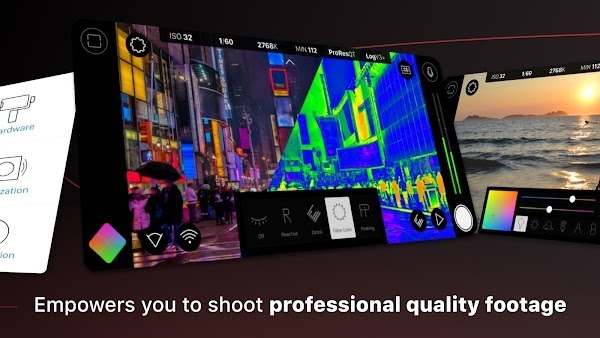
Filmic Pro v7 introduces Quick Action Modals and an Action Slider for fast changes without leaving the live view. Dedicated Focus and Exposure modes let you move between precision control and quick adjustments as scenes change. ISO, shutter speed, white balance, and gamma are accessible with minimal taps so you can set up a shot quickly.
Manual camera control
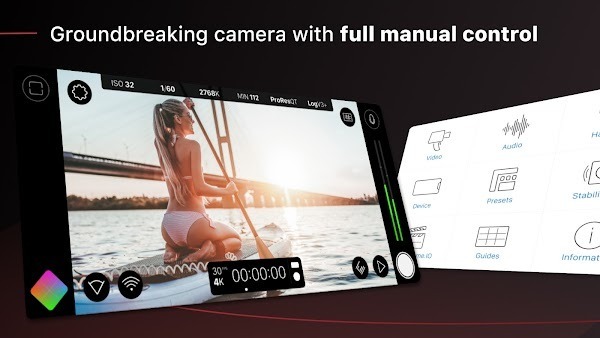
You can set focus, exposure, frame rate, bitrate, aspect ratio, and audio levels directly on the screen. A customizable Fn button lets you map a frequently used control to a single action, which shortens setup time on repeat shots. This approach helps keep filming consistent from clip to clip.
Cinematic imaging tools
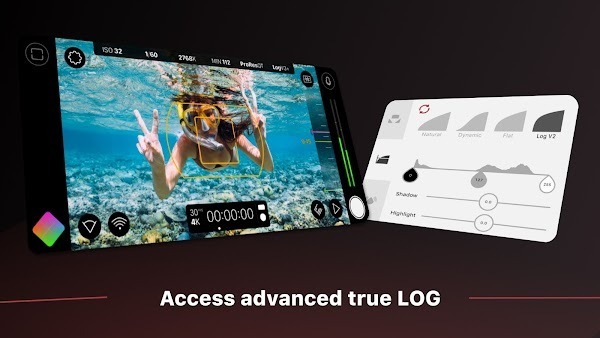
Filmic Pro offers Log and Flat gamma options to capture a wider range for grading. Realtime Film Looks provide visual styles during capture if you want an in camera preview of a grade. Live analytics including zebras, false color, and focus peaking help you confirm exposure and focus before you roll.
Advanced recording formats and speeds
The app supports 10 bit HDR capture where available, along with 8 bit HEVC or H.264. You can enable clean HDMI out, record time lapse, and switch to slow or fast motion. High speed frame rates up to 240 fps are available on supported devices, and quality presets include FiLMiC Ultra for higher data rates.
Workflow, audio, and hardware support
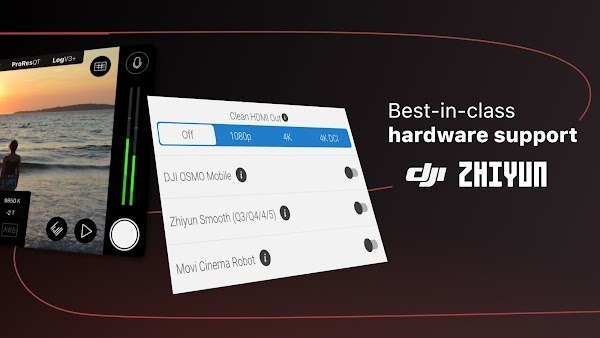
Filmic Pro integrates with Frame.io Camera to Cloud for direct clip upload, and uses industry standard clip naming to keep files organized. You can sync presets across devices, set 16 or 24 bit audio, adjust input gain, monitor sound, and check levels with professional meters. Hardware integrations include anamorphic de squeeze at 1.33x and 1.55x, support for 35mm adapters, and gimbal support for DJI OSMO Mobile, Zhiyun Smooth, and Movi.
Highlights:
Full Control: Take strict control of all editing features in this application based on the photography and video recording knowledge you have. You should adjust the color balance, do not let the image be too bright or too dark.
DSLR-like Experience: Users can have fun using this application like a real camera, and you can take advantage of the skills you know when using it more simply than ever.
Customizable Look: A simple, intuitive, neat, and full-featured interface makes users extremely impressed and highly appreciative of this application.
Unlocks Potential: Feel free to create anything directly on your phone and discover many new and unique features.
Highlights Focus: In this application, you can focus the image right in the center in a great way. Record yourself a complete video thanks to your intuition and smart creativity.
Ensures Focus: Ensuring your focus will help you feel more comfortable and confident when editing photos.
Saves Time: You will save time while using it, and each person will have the power to manually focus the scenes in my movie with ease.
Useful for Macro: Macros are extremely useful for filming and taking photos. Select the effects and colors of each image fully and clearly.
Pros and Cons:
Pros
Capable of high-speed frame rates from 60fps to 240fps
Adjustable focus and exposure via dual arc slider controls
Configure shadows and highlighting in real-time
Plenty of customisation options to help you develop your own filming style
Cons
Function is largely dependent on your device capabilities
Some features aren't available on all devices
Slightly awkward to use professionally in comparison to full-sized cameras
Takes time to learn about all features and how to use them properly
FAQs:
What is Filmic Pro used for?
Filmic Pro is a mobile camera app designed for shooting high-quality videos with manual controls. It’s widely used in professional filmmaking, mobile journalism, and content creation.
Can Filmic Pro replace a DSLR or mirrorless camera?
For many creators, yes. Filmic Pro provides manual control, cinematic presets, and real-time tools that rival traditional cameras — all from your phone.
Does Filmic Pro support external hardware like gimbals and microphones?
Absolutely. It’s compatible with popular gimbals like DJI and Zhiyun, as well as external mics, anamorphic lenses, and HDMI output setups.
Is Filmic Pro beginner-friendly?
While it’s packed with pro features, the interface is clean and customizable. Even beginners can start filming quickly, with more to learn as they go.
What’s the cost of using Filmic Pro?
Filmic Pro offers a subscription model with weekly and yearly options. You get access to advanced features like HDR, Frame.io, and manual audio tools.
Conclusion:
We dreamed a lot of giving our Videography a new style and a new way towards cinematography, but the only thing we lacked was our Android Smartphones. Opportunely, We've now got the way outta there, i.e., Filmic Pro APK. The app is ready now to get downloaded and installed on your Android Smartphone, and all you need is to hit the below giant green download button! Enjoy!




-
Latest Updates
-
Featured Apps