Volume Power
Tools
2026-11-06
3.04MB
3.2.2
Android
93
Screenshots
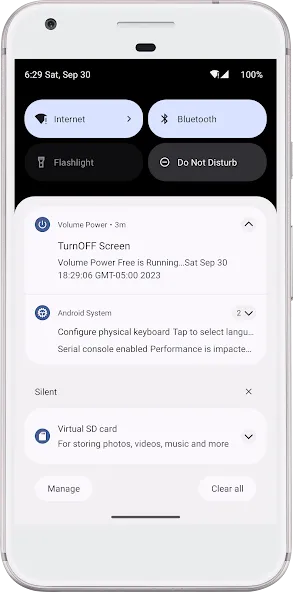
Introduction
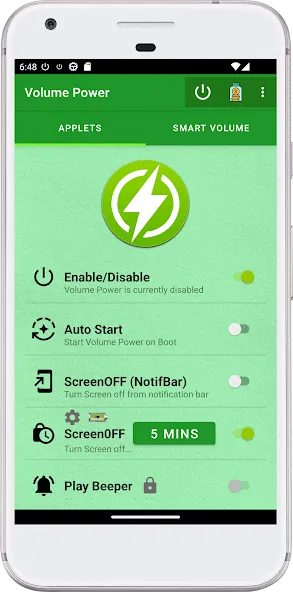
Volume Power is a highly convenient volume control application. Featuring a clean and minimalist interface, it is easy for users to get started right away. It serves as a practical alternative to traditional physical power/volume buttons, offering a more convenient user experience, stable performance, and the added benefit of extending the lifespan of your device's hardware components. The app boasts excellent compatibility, running reliably across a wide range of Android devices—including older versions. It also fosters a vibrant community where users can connect, learn from one another, and share useful tips and techniques. Additionally, you can access content without the need for a login.
Features:
Power Button Functionality
With Power & Volume Buttons, users can easily lock their device screen by simply tapping a power button icon within the app. This feature is highly practical for users whose physical power buttons are malfunctioning, or for those who simply wish to avoid excessive wear and tear on their physical keys.
Volume Button Controls
This app offers an innovative solution for users experiencing issues with their volume buttons. It includes two virtual volume buttons, allowing users to adjust their device's volume without needing to use the physical keys. Whether your volume buttons are faulty or you simply prefer an alternative way to manage your volume, this feature has you covered.
Locking the Screen via Notifications
Power & Volume Buttons enhances the screen-locking experience by providing a notification-based lock feature. Users can enable this option via a toggle within the app. Once enabled, a lock notification appears, allowing you to lock your device screen quickly and conveniently with a single tap.
Power Menu – Restart and Shutdown
When your physical power button stops responding, you may find yourself unable to access the system power menu to restart or shut down your phone. This optional feature adds a button to the app's notification; tapping it opens the standard Android power menu. This feature is disabled by default and relies on the Accessibility Service (described below).
Current Volume Display
Stay informed about your device's current volume level with a convenient text display provided by the app. This real-time volume indicator ensures that you can always check your sound settings at a glance.
Highlights:
Instant Screen Wake: Wake your screen in an instant with a simple press of a volume button—a responsive solution that saves you from the hassle of a faulty power button.
Seamless Screen Off: Turn off your screen quickly using our optimized notification bar shortcut—much more convenient than reaching for physical buttons!
Low Resource Usage: We know your battery life is precious. This app runs in the background with minimal impact on system resources.
Reliable Background Service: Our Always-On mode ensures the app stays active and ready whenever you need it.
Security First: Device administrator permissions are required to securely lock your screen.
Transparent Permissions: We only request the permissions necessary for the app to function as intended.
Advantages and disadvantages:
Pros
Lets you wake the screen using the volume buttons, useful when the power key is broken
Optional notification-bar shortcut to turn the screen off
Free to use with no ads
Widely used and focused on a single, practical purpose
Cons
Does not let volume buttons lock the screen directly, only via a notification shortcut
Conclusion:
In short, if your power button is broken and you are running an older version of Android, Volume Power is an excellent app worth considering. It simplifies functionality into a single trigger event, making it highly accessible for novice users. Volume Power offers an easy workaround for a faulty power button, providing a user-friendly way to manage screen functions with minimal effort.





-
Latest Updates
-
Featured Apps