
PhotoFox Editor
Photography
2026-11-10
9.96MB
1.2.0
Android
72
Screenshots

Introduction
PhotoFox Editor is a powerful photo editing tool. It offers robust capabilities: simply upload a product photo, and the software’s AI-driven features can automatically generate marketing videos and advertising assets. No professional expertise is required—users can transform ordinary product photos into high-quality images just by entering a text prompt. The built-in AI video generator can create short videos (lasting 5 to 10 seconds), and the platform also includes features like one-click background removal. Additionally, it can be used to restore old photographs while preserving the original lighting and focus.
Features
Magic Mode / Campaign Generator: Upload a single product photo to generate complete studio shots, marketing videos, and ad variants automatically.
Product Photography: Transform basic product shots into professional, studio-quality images with AI-generated lighting and backgrounds.
Fashion Photography & Human Model Builder: Showcase clothing on diverse, realistic AI-generated models (customizing ethnicity, age, body type, and pose).
AI Video Generation: Create short product and social media videos (in 5s/10s formats) directly from static images.
Image Upscaling: Upscale images up to 8K resolution without losing quality, sharpening edges and reconstructing fine details.
AI Background & Touch Remover: Automatically erase or replace image backgrounds and clean up blemishes or unwanted elements.
Function
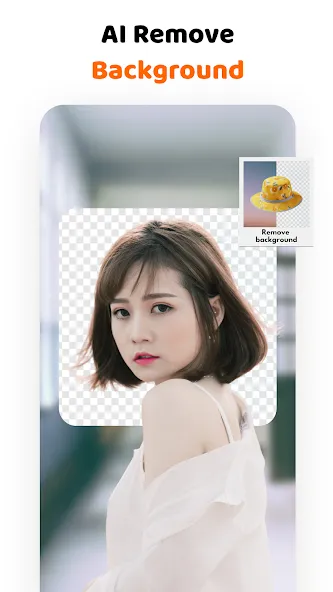
AI Background Remover
Accurately remove backgrounds in seconds. Simply upload an image, and the AI will automatically detect and remove the background, leaving only the main subject.
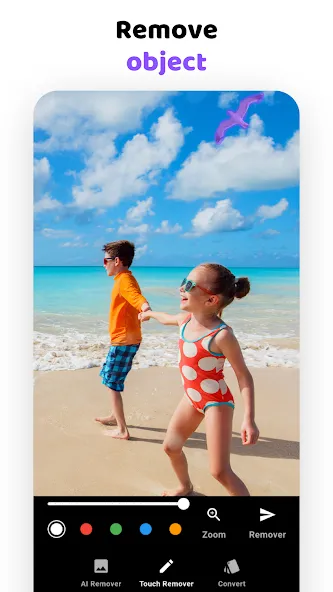
Touch Remover
Easily eliminate unwanted blemishes or objects from your photos with the Touch Remover. With just a few taps, you can select any area of an image; our advanced tool will then seamlessly blend that spot to match the surrounding pixels—perfect for retouching photos to a professional standard.
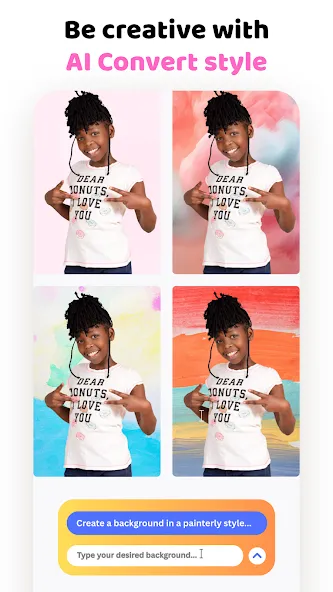
AI Style Transfer
Transform your images with the power of AI. AI Style Transfer allows you to apply various artistic styles to your photos, turning them into unique works of art. Choose from a wide range of predefined styles or create your own. The AI analyzes the content of your photo and intelligently applies the selected style, ensuring a stunning visual result that brings your creative vision to life.
Tips
Start with a Solid Base Photo: Ensure your lighting, focus, and framing are as clean as possible before editing so you aren't trying to rescue a blurry or underexposed shot.
Master Layers and Blending Modes: Stack multiple images on separate layers, use the Eraser or masks to clean up edges, and experiment with blending modes like Soft Light to make double exposures or artistic overlays blend smoothly.
Use AI Style & Filters Wisely: Apply creative features like AI Convert Style to transform photos, or tone down intense filter effects by lowering their opacity or changing the layer blending mode so the result looks natural rather than overprocessed.
Summarize
Overall, PhotoFox Editor is a must-have app for anyone looking to take their photo editing skills to the next level. With its powerful features and user-friendly interface, it's the perfect tool for unleashing your creativity and creating stunning images.





-
Latest Updates
-
Featured Apps