
HideX
Tools
2026-09-15
69.39MB
2.4.0
Android
169
Screenshots


Introduction
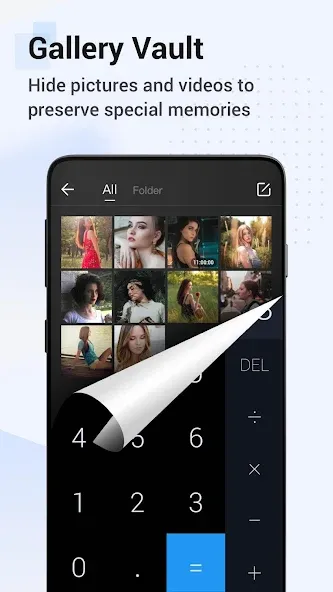
Calculator Lock – Video Lock & Photo Vault – HideX is a privacy protection app for Android. It features a disguise mode that prevents unauthorized access, allowing users to set a custom security code to safeguard their privacy. Users can enable incognito mode while browsing to protect their history and receive alerts against unwanted or harmful content. The app also offers customization options for themes and wallpapers. With its user-friendly interface, it is easy to get started and use effectively. It provides enhanced protection for sensitive information and offers free features for managing apps, photos, and videos, making it a powerful security tool.
Features:
Hide photos and videos behind a calculator lock
Create a video vault to protect your private videos
Hide images, videos, and any other type of file
Easily hide photos and videos from your gallery
Hidden files (photo and video vaults) are stored in an encrypted private vault
The private image vault functions as a hidden video vault that does not appear in the list of recently used apps
Highlights:
Browser: A built-in privacy browser that lets you safely visit private sites and download photos from the web; downloaded photos are instantly locked in the vault, leaving no trace on your system.
Shake to Close: Quickly close the app by shaking your phone—keeping you in full control.
Intruder Selfie: Automatically captures a photo of anyone attempting to breach your privacy by entering an incorrect password.
Virtual Vault: Create a virtual vault with a separate password to store decoy photos and videos.
Fingerprint Unlock: Offers a faster, more secure way to unlock the app.
Colorful Themes: Choose from a variety of stylish colors to create a theme that’s uniquely yours.
FAQs:
How do I view apps hidden within Calculator Lock – Video Lock & Photo Vault – HideX?
The Calculator Lock feature (Video Lock & Photo Vault) automatically hides apps, causing them to disappear from your app list. They cannot be accessed via the menu or found through search engines. To access these apps, you must unlock the calculator.
What happens if someone opens Calculator Lock – Video Lock & Photo Vault – HideX?
If someone opens the Calculator Lock – Video Lock & Photo Vault – HideX app on your Android device, they will see an ordinary calculator that can be used for simple math operations. You need to enter your password to unlock its hidden features.
How can I recover my Calculator Lock – Video Lock & Photo Vault – HideX password?
It is not possible to recover your Calculator Lock – Video Lock & Photo Vault – HideX password. The app is designed to prevent unauthorized access to your list of hidden games and apps; therefore, if you forget your password, you must uninstall and reinstall the app.
How do I unlock Calculator Lock – Video Lock & Photo Vault – HideX?
To unlock Calculator Lock – Video Lock & Photo Vault – HideX, enter the correct password. Without the password, you will not be able to access the list of hidden games and apps.
Advantages and disadvantages:
Pros
Multi-purpose calculator
Hide and lock various files
Trusted by millions worldwide
Sufficient cloud storage space
Cons
Some features are paywall restricted
Conclusion:
In short, if you are looking for a way to protect private media on your device, Calculator Lock – Video Lock & Photo Vault – HideX is an excellent privacy app that safeguards your personal information by disguising itself as a calculator. It does not perform any actual calculations; instead, it hides the information and apps you wish to keep private.




-
Latest Updates
-
Featured Apps






