Efiko
Photography
2026-10-13
22.03MB
1.6.2
Android
96
Screenshots

Introduction
Efiko is a classic photo and video editing tool. Packed with powerful features, it enables the creation of high-quality, sophisticated images and videos. Its clean, intuitive interface allows users to get started quickly and utilize various functions to suit their specific needs. Even beginners with no prior experience can produce professional-looking videos. The app offers excellent compatibility across a wide range of devices, and finished videos can easily be shared with friends and family or posted to other platforms. It boasts robust customization options, allowing users to crop images and apply special effects, while also supporting real-time subtitles and background music. Overall, it is a comprehensive app featuring aesthetic filters and a full suite of editing tools.
Features:
Unified editor for photos and videos
Efiko keeps your workflow simple by supporting both photos and videos in one editor. This makes it easier to maintain the same look across different content types without extra steps.
One tap presets for quick results
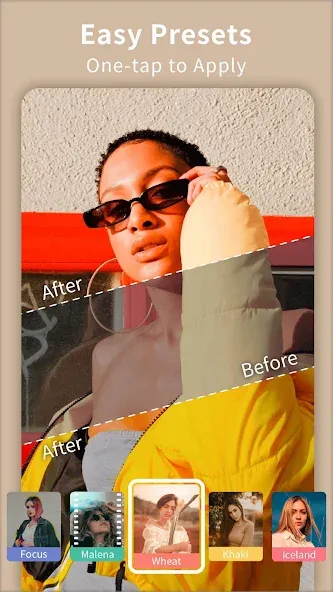
You can apply on-trend looks with a single tap, which saves time when you need social-ready edits. Moreover, Efiko organizes presets by style so you can preview options and pick a direction fast.
Adjustable effects with fine control
Efiko lets you tweak intensity, shimmer, and light to match your footage, so you do not need advanced skills to refine results. After you apply a preset, you can fine-tune details to balance mood and clarity.
Signature aesthetics users search for
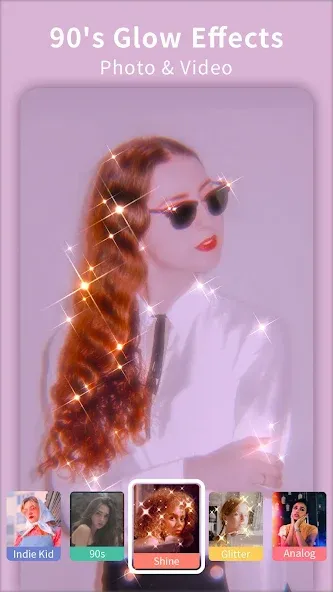
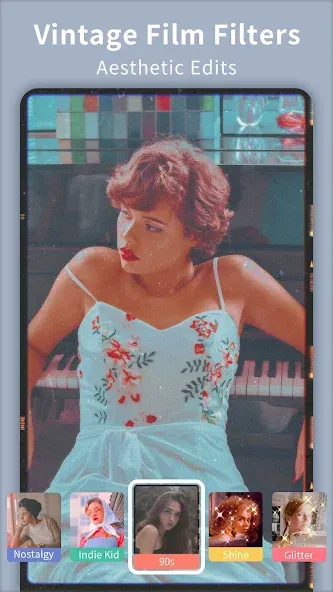
Efiko includes looks such as adjustable glitter and shimmer, VHS and 90s film, Lomo light leaks, Miami vintage purple, and Glitch. Therefore, you can reproduce popular styles that fit nostalgic, cinematic, or playful themes.
Large library of effects and filters
The Efiko app offers hundreds of effects and filters and more than one hundred presets that match current social trends. Also, you can mix presets with manual adjustments to create a custom look while keeping editing time short.
Free to start, premium for full access
It is free to download and use with a basic set of filters and effects. In addition, the premium upgrade of Efiko unlocks most presets and removes the export watermark so your final video or photo is clean and ready to post.
Highlights:
A glitter effect that lets you tweak both the amount of sparkle and its color, so you can match the mood of your photo or video.
VHS-style effects that recreate the feel of old videotapes, useful when you want a nostalgic, analog look.
Vintage options inspired by 90s film stock, along with Lomo filters that give a popular leak-light vibe.
A Miami-style filter that adds a purple-tinted, hazy atmosphere for a soft, dreamy finish.
Blur filters that apply a gentle soft-focus to part or all of the image.
Additional retro and digital looks such as glitch or glow filters, giving you more ways to stylize footage.
FAQs:
What effects and filters does Efiko include?
Efiko includes a diverse range of effects including 90's glows, glitter, sparkle, VHS, Miami, Lomo, glitch, and the upcoming Cyberpunk and Polaroid effects. The expanding library covers aesthetic styles from vintage and retro film looks to modern digital glitch effects.
How do I apply Efiko filters to videos?
Efiko's interface lets you import videos or photos and apply filters with one click. The VHS effect recreates videotape aesthetics, while the Miami effect adds vintage purple tones. Many effects allow customization of intensity and color to match your style.
What presets does Efiko have available?
Efiko includes over 100 presets tailored for specific photography styles and visual subjects. Available options include cinematic teal and orange color grading, analog and vintage camera effects, disposable camera aesthetics, plus specialized presets optimized for food and city photography.
Can I share Efiko videos to social media?
Yes. Efiko supports direct sharing of edited videos to social media platforms from within the app. After applying your chosen effects and presets, you can export your finished videos and share them immediately to your preferred social networks and accounts.
Advantages and disadvantages:
Pros
Easy to use
Variety of aesthetic styles
Cons
Watermark on free edits
Conclusion:
Download the Efiko APK for Android to enjoy complete freedom in editing your photos and videos. Feel free to apply retro, glitch, or glow filters to give every still image or video clip a unique style. You can even use VHS filters to give your videos a vintage look and feel.
-
Latest Updates
-
Featured Apps