Solid Explorer File Manager
Productivity
2026-09-11
24.12MB
3.5.20
Android
453
Screenshots

Introduction
Solid Explorer File Manager is a file management app for Android. It offers powerful features and customizable shortcuts, enabling users to efficiently organize their mobile storage. Supporting a wide range of file formats, the app is compatible with most devices. It categorizes files to save users time during searches and excels at securely preserving content. With its intuitive, minimalist design, the app is easy to pick up—even for first-time users. It supports drag-and-drop file operations while ensuring robust privacy and security, offering a streamlined, premium file management experience.
Features:
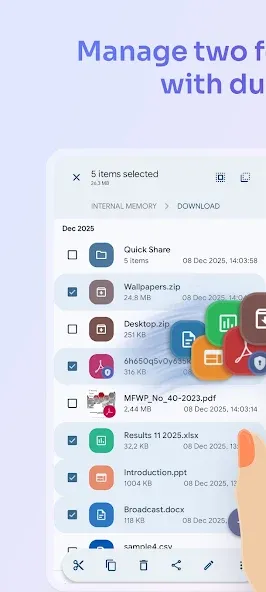
Dual-pane layout — manage two folders side by side
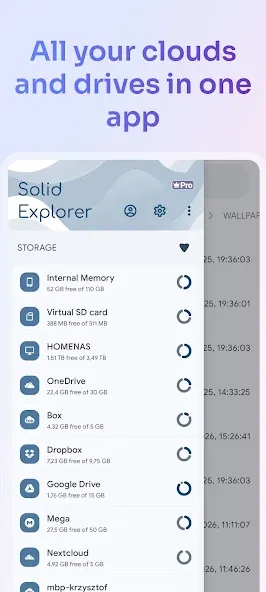
Cloud storage — Google Drive, OneDrive, Dropbox, Box, NextCloud, SugarSync, MediaFire, Yandex, Mega
Network protocols — FTP, SFTP, SMB/CIFS (Samba), WebDAV
Web file sharing — share files with any device via browser
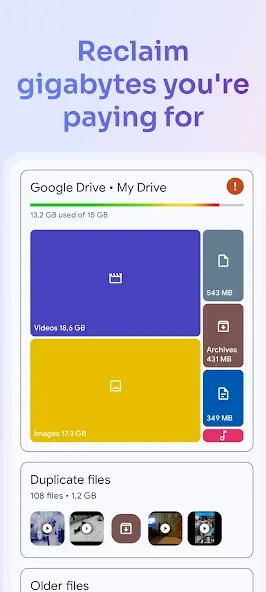
Storage analyzer — find duplicates, large files, and junk to clean up
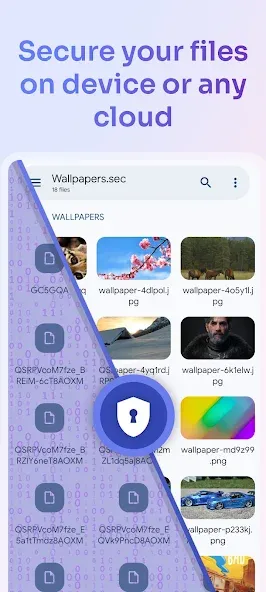
File encryption — AES-256 with password and fingerprint
Archives — create and extract ZIP, 7ZIP, RAR, TAR
Root explorer — browse system files on rooted devices
Indexed search — find files instantly with filters
Collections — Downloads, Recent, Photos, Videos, Music, Documents, Apps
Built-in media — image viewer, music player, video player, text editor
FTP Server — access your phone's files from PC
Themes and icon sets — rich customization
Chromebook & tablet support — mouse, keyboard and trackpad input
Highlights:
Provides a clear side-by-side view of two locations: The most important purpose that users discover and take advantage of is that they will be able to view 2 documents at the same time on 1 phone from there. Get a more accurate comparison.
Supports drag and drop between both panels: Converting files back and forth is also quite easy to use as users just need to drag and drop files to the secondary screen to open the full document to continue working.
Looks great and is easy to use: Intuitive and visually appealing interface based on Material Design principles
Offers both light and dark themes: To help users use their phones more comfortably at night or in places with low light, the app also provides them with a mode to help them switch back and forth. Between day mode is night mode.
Packed with all essential file management tools – copy, move, delete, rename, share: The application has all the basic tools to help users comfortably use, from copying to renaming and even file sharing. The strength here is that users can share files only via Bluetooth.
Useful extras like batch rename, ZIP compression, and app manager: With this application, the user’s mobile device will also be allowed to become more like a computer when unzipped files are allowed to decompress on the device, and it will automatically go into a separate folder.
FAQs:
What is Solid Explorer File Manager?
It is an Android file management app that helps users organize, move, and control files across local storage, cloud services, and network locations.
Is Solid Explorer suitable for beginners?
Yes, basic features like file browsing and moving files are easy to use, though advanced tools may take some time to learn.
Can Solid Explorer access cloud storage?
Yes, it supports services like Google Drive, Dropbox, and other remote storage options within a single interface.
Does Solid Explorer support file compression?
Yes, it can open and create archive files such as ZIP and RAR without needing extra apps.
Advantages and disadvantages:
Pros
Dual-pane layout
Streamlined file handling workflow
Supports various cloud storage services, NAS, and servers
Encryption supports password and fingerprint protection
Cons
Requires a learning curve
Summarize:
If your Android device often feels cluttered or difficult to organize, this app can help you establish more efficient file management habits. It offers a range of tools that allow you to locate files faster, move data with ease, protect important content, and manage storage space more conveniently. For anyone looking to take confident control of the files on their Android device, Solid Explorer File Manager is a file manager worth considering.




-
Latest Updates
-
Featured Apps