GPS Map Camera : GeoTag
Maps & Navigation
2026-10-29
27.45MB
1.2.5
Android
268
Screenshots
Introduction
GPS Map Camera: GeoTag is a powerful geolocation application. The app features a very simple design, though the user interface can sometimes make it difficult to navigate back to previous screens. It allows users to overlay map data onto their photos, effectively embedding location information directly into the images. The app is feature-rich, offering tools such as a grid overlay, camera controls, and various shooting modes. It is compatible with a wide range of Android devices and image-editing software, helping users preserve precious contextual details. With robust customization options, users can select specific map types and add time stamps or other notes. Providing comprehensive and detailed geographic data, it serves as a convenient tool for those who love to document their experiences and travel.
Features:
This app allows users to add location tags to their photos—a feature especially useful for travelers and explorers who wish to document their journeys with precise geographic information. With this app, users can easily geotag their photos, making it simple to recall their experiences and share them with friends and family.
Professionals in fields such as real estate, construction, and infrastructure can also benefit from the GPS Map Camera. The app enables them to add GPS location tags to on-site photos, which is essential for documentation and presentations. By including precise location data, users can enhance the clarity and relevance of their images.
For those celebrating significant milestones—such as weddings, birthdays, or anniversaries—the app acts like an instant camera. Users can tag their current GPS location at the moment a photo is taken. This adds a personal touch to event photography, allowing users to revisit these special moments while knowing exactly where they occurred.
By using GPS location tags, event attendees can document their experiences and share their whereabouts with colleagues or friends, keeping everyone informed. This feature facilitates communication among participants and can even help in expanding professional or social networks.
Bloggers in the travel, food, fashion, and art sectors can elevate the quality of their content by incorporating GPS data. The app allows users to add location information, providing context to their posts and boosting reader engagement. By including precise geographic details, bloggers can offer their audience a richer, more immersive experience.
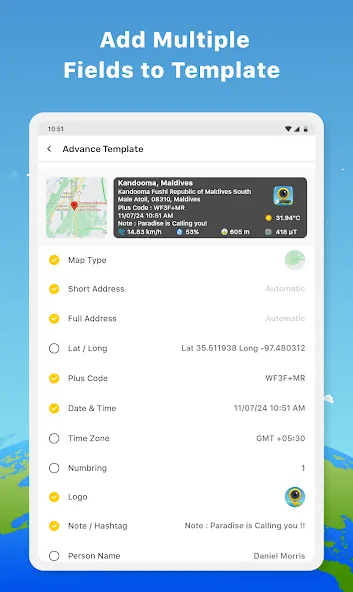
Choose from a variety of templates—ranging from premium to classic styles—that allow you to customize the format of your location tags to suit your personal preferences.
The app offers flexible ways to display location data, including Standard, Satellite, Terrain, and Hybrid views. Furthermore, it automatically adds a concise address to each photo, streamlining the process of attaching relevant location information.
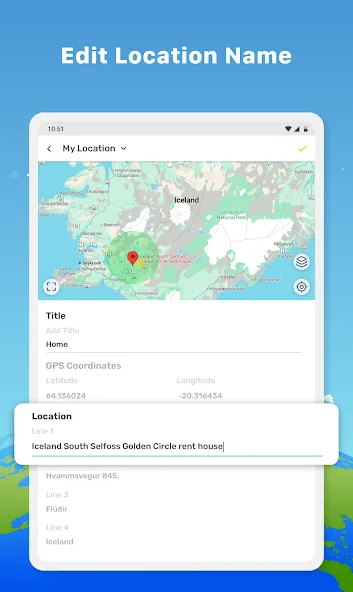
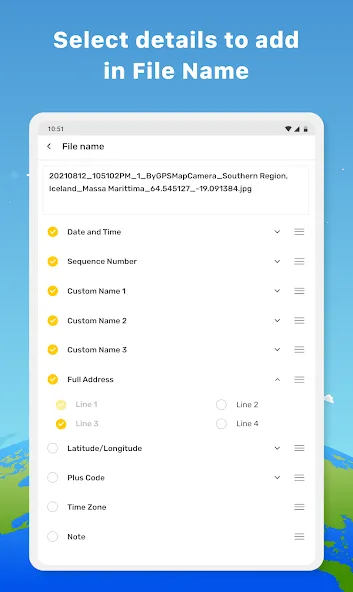
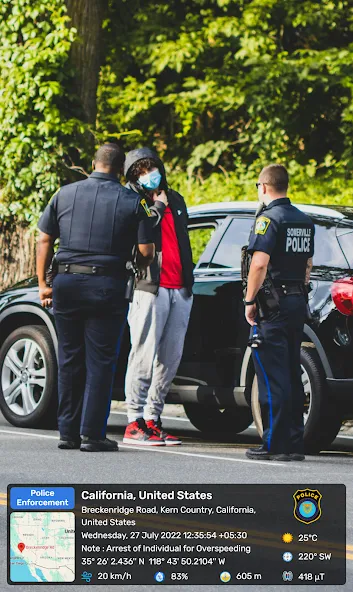
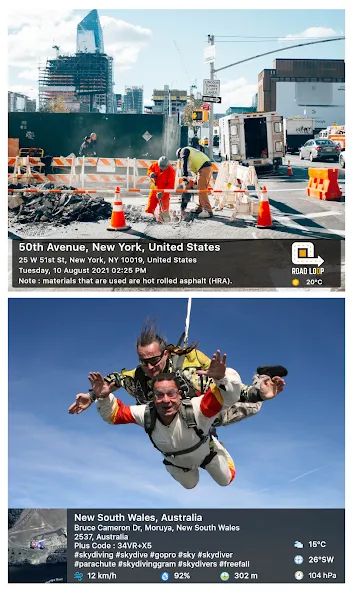
For users who require precise geographic data, the GPS Map Camera allows for manual address entry or automatic generation based on the current location. The app supports latitude and longitude input, with options for both Degrees, Minutes, and Seconds (DMS) and decimal formats. Users can also specify exact GPS coordinates to ensure the highest level of accuracy for their location tags. This app also provides additional information that may be relevant to the user. For instance, it can display weather conditions—in either Fahrenheit or Celsius—adding further detail to your photos. Data such as magnetic field, wind speed, humidity, atmospheric pressure, and altitude can also be measured and incorporated into your images. This wealth of information helps enhance the narrative quality of your photos.
Highlights:
Automatically add geotags to photos and videos
High-precision GPS camera with real-time GPS location display
Advanced GPS map camera featuring customizable map stamps
Record GPS-mapped videos using the map camera tool
Display compass, altitude, and orientation for every shot
Supports various date and time formats for global use
Add notes and tags for record-keeping or evidentiary purposes
FAQS:
Can this app be used offline?
It can function without an internet connection, making it suitable for use in remote areas.
Can GPS tags be edited after a photo is taken?
The app allows tags to be added or edited before taking a photo, but it does not support editing them afterward.
Does the app add a timestamp to photos?
Yes, it includes a timestamp option that can mark the time each photo was taken.
Advantages and disadvantages:
Pros
Extensive customization abilities
Provides comprehensive geodata
Has a built-in camera with high-functioning features
Cons
Camera can run into zoom and focus issues
Conclusion:
GPS Map Camera: GeoTag is an application designed specifically for enthusiasts of geotagging, allowing for the seamless embedding of location data into photographs. With its built-in camera functionality and map integration, it serves as an invaluable tool for users who wish to document the exact locations where their cherished memories took place.




-
Latest Updates
-
Featured Apps