GPS Camera
Maps & Navigation
2026-10-29
37.55MB
1.9.40
Android
581
Screenshots

Introduction
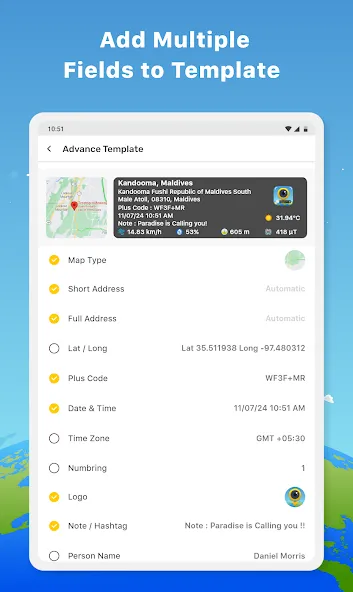
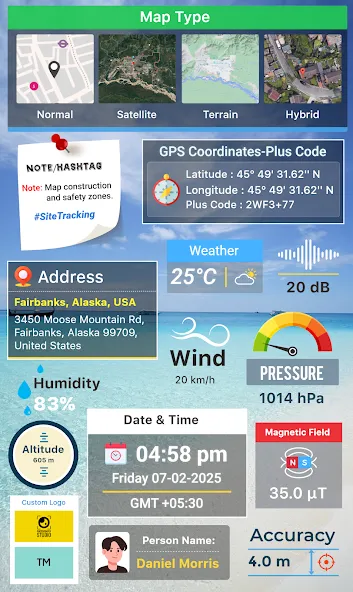
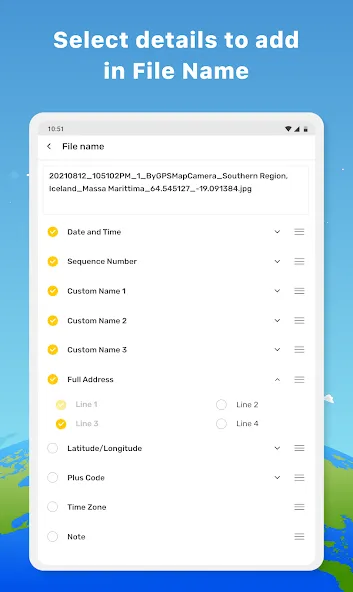
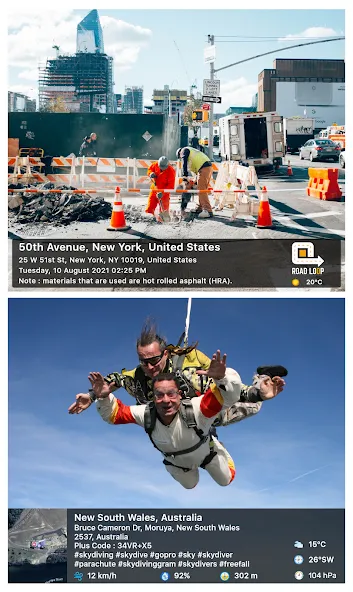
GPS Camera is a GPS-enabled camera app for Android devices. It features seamless geotagging, allowing metadata to be overlaid directly onto your images. This enhanced visual documentation ensures that the captured information remains clear and easy to read, with customizable options for font style and color. The intuitive interface allows users to get started quickly, and the app supports offline functionality. By leveraging built-in sensors and cached offline maps, it provides precise navigation even in remote areas. The app also incorporates measures to protect user privacy.
Features
Seamless Geotagging Technology
The core functionality of this utility revolves around its ability to overlay comprehensive metadata onto images without manual intervention. Users can customize the layout of the geographic information, choosing between various map styles, coordinates, and weather details that appear directly on the frame. This capability is particularly useful for professionals who must provide visual evidence of site visits or project progress in specific locations.
Enhanced Visual Documentation
Beyond simple data embedding, the software offers a robust set of customization options to ensure that the information remains legible and aesthetically pleasing. You can adjust font styles, colors, and the positioning of data stamps to suit different lighting conditions or backgrounds. This level of flexibility makes GPS Camera a versatile choice for anyone looking to create professional-grade logs of their journeys or fieldwork.
Intuitive User Interface
Navigating through the settings and capturing images feels fluid thanks to a clean, minimalist design that prioritizes ease of use. The interface allows for quick toggling between different data types, ensuring that you only display the information relevant to your current task. By removing unnecessary clutter, this solution enables you to focus entirely on the subject matter while the background processes handle the technical details of location tracking.
Reliable Offline Functionality
One of the most impressive aspects of this tool is its ability to maintain high levels of accuracy even when mobile data is limited or unavailable. By utilizing internal sensors and offline cached maps, the system continues to record precise location data during remote expeditions or hiking trips. This reliability ensures that your documentation remains consistent and trustworthy regardless of your connectivity status in challenging environments.
Advantages and disadvantages
Pros
Automatically adds GPS data to photos
Displays images on an interactive GPS map
Includes advanced camera settings
Cons
Relies on third-party apps for full functionality
Occasional crashes
FAQS
How does GPS Camera handle privacy settings?
The software respects user privacy by allowing you to toggle location access on or off for specific sessions. You maintain full control over which photos contain embedded metadata before sharing them externally.
Is GPS Camera compatible with various social media platforms?
Yes, the images generated are standard high-resolution files that can be uploaded to any social platform. The embedded data remains visible as part of the image, providing clear context to your audience.
Does the tool consume excessive battery life?
The system is optimized for power efficiency, though constant GPS usage will naturally impact battery consumption. It is recommended to use the tool in short bursts during intensive field work to preserve longevity.
User comments
Excellent app! Very accurate navigation, easy to use, and extremely helpful for finding routes and nearby places. Traffic updates are reliable, and the overall experience is excellent. Highly recommended. Thank you, Google Maps team.
The GPS accuracy is absolutely top notch. As soon as you click a photo, it captures the correct location, time, latitude, and longitude. I use it for site visits and attendance. No ads, no lag. Fully satisfied
I used the GPS camera during my audit visit. The app worked properly and captured clear images. The location, date, and time stamps were accurate. It is easy to use and did not have any delays. Overall, the GPS camera is reliable for audit purposes.
Summarize
GPS Camera is an app that turns your camera into a highly comprehensive geolocation tool. The idea is that you can take a photo, and various information such as the exact location, date, time, map, altitude, weather, and other technical data that would normally be lost is automatically added to it. It's perfect for travel, work, or simply for saving memories with added context.
-
Latest Updates
-
Featured Apps