Video Star
Entertainment
2026-10-30
70.39MB
2.1
Android
252
Screenshots
Introduction
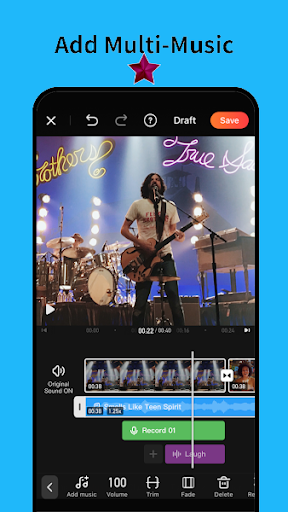
Video Star is a feature-rich video editing application that provides a wide array of tools, enabling users to create impressive videos right from their mobile devices. The app offers a variety of templates—complete with pre-configured special effects—that are ready for immediate use. It also includes a selection of stylish themes, adding extra flair to your videos. With its user-friendly interface, the app makes it easy to discover and utilize all its features. Furthermore, it allows users to quickly and conveniently share their creations across various social media platforms.
Features:
Professional Editing Tools: Access various tools for precise video and photo editing, including cutting, trimming, and merging.
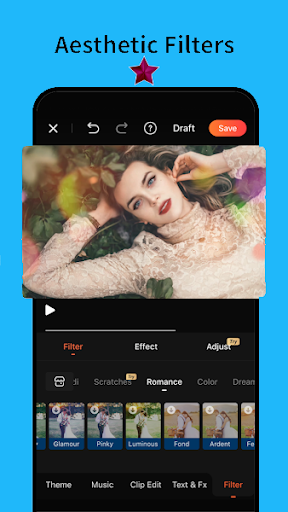
High-Quality Filters: Apply filters to enhance the look of your videos and photos with just a few taps.
Customizable Transitions: Choose from numerous transition effects to make your video edits smooth and dynamic.
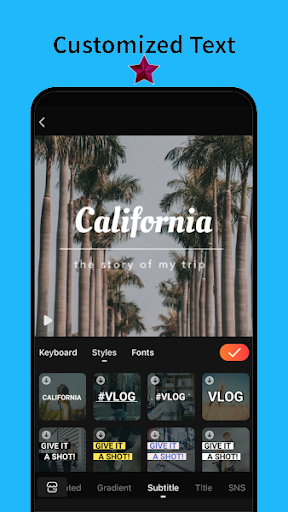
Text and Stickers: Add text and stickers to your videos and photos to make them more engaging and fun.
Music Integration: Incorporate your favorite music tracks into your videos to create the perfect soundtrack for your content.
Speed Adjustment: Control the speed of your video clips, allowing you to create slow-motion or fast-motion effects.
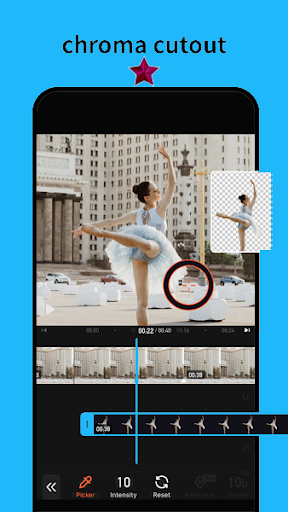
Advanced Effects: Utilize advanced effects like zoom, pan, and color correction to give your videos a professional touch.
User-Friendly Interface: Enjoy a simple and intuitive interface that makes navigating and using all the app's features easy to navigate.
Highlights:
All-in-one video editing app that helps everyone create incredible videos.
High quality video templates with magic effects and transitions.
Video editor app with stylish themes to create amazing vlog.
Easy to use photo slideshow with BGM and unique filters.
Advanced video adjustment to edit video professionally.
Pros and Cons:
Pros
Free to download, use and upload videos
Easy to use
Allows for many types of videos to be created
Has limited social networking aspects
Cons
Has been noted to have too many ads, disrupting the overall experience
Buggy, with some users noting it crashes upon opening
User Reviews:
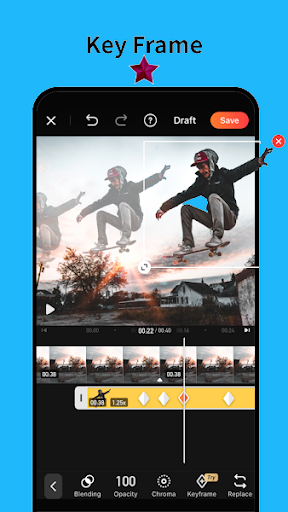
I’ve been using VideoStar for almost a year now, or I believe that it has been a year.The app is great!!! If you use all the effects you are given you could make such a wonderful edit. However, on the topic of effects, the new update with the text effects isn’t the best. The text effects are choppy even with decent graphs. I’m not sure if putting it on a longer clip would do it justice but so far I don’t find it worth spending your money on. You could’ve added text explosion or something that you see in edits regularly. It would save editors a LOT of time. You should also consider getting some decent turbulences. Not the old turbulences, I’m talking about GOOD ones that look somewhat like AE. No matter how hard you try with the turbulences provided it still is not the best.Other than the lack of effects that people are asking for, the app is overall great. I would highly recommend it for ANY editors. Whether you’re beginner, intermediate, or experienced, this is right for you!!! If you are a beginner I would start on apps such as Funimate or apps that teach you the basics. Before you get on VS you have to learn at least what keyframes are and how to properly use them, or wing it. We don’t care.
Conclusion:
Video Star has bare minimal tools to make short video clips. On the other hand, users can still enjoy the videos that others have shared online. Anyone can both produce and watch video clips at the convenience of their mobile devices. If you’re not the type to delve into complex editing features and just want to edit videos and share them as soon as possible, then give this app a try.




-
Latest Updates
-
Featured Apps