Boom: Music Player
Entertainment
2026-08-04
1.9MB
2.0.5
Android
386
Screenshots
Introduction
Boom: Music Player is a music software that allows users to play music of exceptionally high quality. It features basic 3D effects that are incredibly realistic, making users feel as if the singer is right in front of them, performing exclusively for them, without any background noise. The software also boasts a vast library of copyrighted songs, allowing users to find everything they want to listen to, from popular hits to niche tracks. Furthermore, it includes radio broadcasts, allowing users to search for their favorite stations. Utilizing its audio enhancement technology, the software elevates the sound quality of both music and radio broadcasts, providing a noticeable difference. We hope users will be drawn to the charm of this software.
Function
SUPPORTS SONGS FROM VARIOUS SOURCES
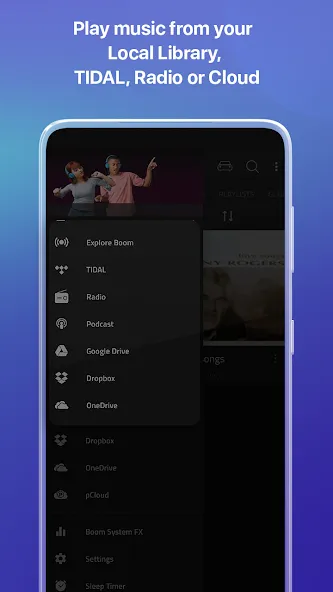
The first feature you cannot miss when you use the application is the songs you can listen to and their source. Specifically, you will easily access the local files available on the device or access the audio files that appear on the cloud services you use. This feature becomes even more impressive when the developer allows users to listen to the songs they have heard in some applications such as Spotify.
APPLY EQUALIZERS FOR EXCELLENT SOUND QUALITY
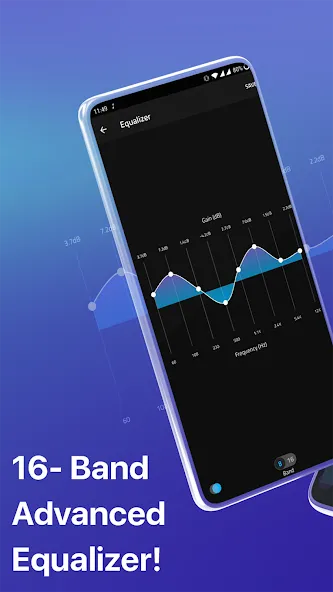
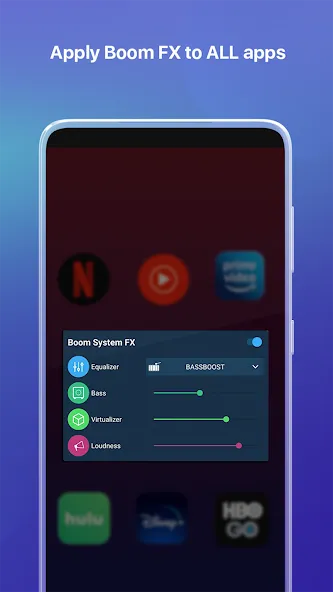
One of the factors that makes Boom so valuable for users is the equalizer and visualizer system that they can customize. Besides the impressive sound effects, you can also find different equalizer presets to enjoy the sound quality you feel is right and reduce some factors like bass. In addition, you can also adjust and create your own presets right after and take advantage of the music characteristics that the application provides.
COMPATIBLE WITH DIFFERENT HEADSET DEVICES
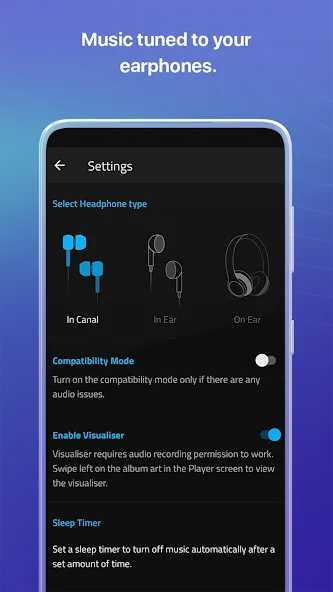
Headphones are often a valuable device for listening to music, and Boom also has corresponding features to support the type of headset you are using. You will get options and choose the correct headset type. At the same time, below are the included features to ensure the compatibility of the headset, visualizer, and sleep timer settings properly so that you can easily specify the time of experience you want.
Highlights
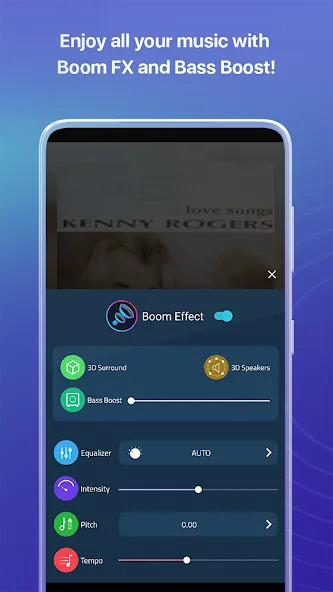
Realistic 3D Audio: The application brings realistic 3D sound to all headphones. Users can transform their listening experience through the application’s outstanding music playback features. 3D Sound System processes the sound of all records so that they are played in the best sound state.
Spatial Clarity Boost: The application supports the operation of sound in an unreal 3D space. From there, spatial signal extraction is performed to achieve three-dimensional clarity. This makes the music played truly immersive and engaging. Users can feel and enjoy this very special enhancement.
Patent-Pending Technology: The system shares quality sound systems to serve the needs of listening to music, processing records, and many other audio-related activities. The application also provides powerful patent-pending technology to enhance the sound quality of every music.
Wide Streaming Support: The app supports TIDAL streaming, device music, and cloud services such as Dropbox and Google Drive. Users can connect to these cloud services for more data for music playback. All of this is done online and is supported in great detail.
Handcrafted Equalizer Presets: The adjustments that users can make include 22 manual equalizer presets for all genres. In addition, they can also set custom EQ right on the app. Users are allowed to adjust freely when operating with the manual equalizer.
System-Wide Audio Boost: Not only limited to the operating range within the app, the system also enhances all apps with system-wide sound effects. This means the app also supports enhancing sound quality on Netflix, YouTube, etc.
Advantages and disadvantages
Pros
Powerful 3D audio processing that creates a more expansive and immersive soundstage
Effective bass boost and detailed 16-band or 8-band equalizer with customizable presets
Works with Spotify, TIDAL, and local music libraries
Supports high-resolution audio formats, including AIFF, FLAC, ALAC, WAV, and DSF
Access to more than 40,000 radio stations and podcasts from around the world
Simple, intuitive interface with key controls accessible from the main screen
Free tier available, with affordable yearly subscription and a one-time lifetime upgrade option
Cons
Full feature set and ongoing high-end audio access require a paid upgrade
Strong processing focus may not appeal to listeners who prefer a very neutral, unaltered sound
Depth of equalizer options can feel excessive if you only need a very basic music player
User comments
Without this app, I wouldn't want to listen to music anymore, and that's no exaggeration. Playing music with this essential app is simply fantastic! I encountered an unexpected bug recently, and they fixed it immediately. What more could you ask for?
I love music; in fact, I'm a DJ, so I know a lot about sound quality, software, and so on. Because of this, I've tried many music apps in hopes of finding the best. Yes, I've encountered some good apps, but in my opinion, "BOOM: Music Player" is the real gem. About two years ago, I bought the Mac desktop version (which is also excellent) and used their BOOM Remote to control all the functions. Last year, I bought a one-year subscription, which expires in a week. I use BOOM at least five days a week, several hours a day (very frequently), and I've personally never encountered any problems, such as crashes. In fact, after their most recent update, I think it's even better. I'm absolutely convinced it's the best music player app, so I simply bought the lifetime version. If I had to nitpick, there's only one thing I hope they'll add/fix: I hope the developers see this review, hear my feedback, and fix it. My truck's audio system (custom version) comes with a remote, so I don't need to touch the radio or my phone at all. But with the BOOM app, I can only skip to the next song... switching between tracks. It would be great if I could scroll/fast forward within a song... meaning, if I only want to hear a specific part of a song, I have to open my phone/app and scroll manually. But it's not a huge problem, though; it's still a great app. By the way, their customer service is getting better and better! I always get a quick reply to my emails!
Summarize
Boom: Music Player Bass Booster and Equalizer is built for listeners who feel that standard phone playback is too flat or too quiet. With its patent-pending 3D engine, detailed equalizer, support for high-resolution files, and massive catalog of radio and podcast content, it turns your Android device into a far more expressive music platform.If you enjoy customizing your sound and appreciate a bolder, more immersive presentation, Boom is easy to recommend. Those who prefer an untouched, neutral signal may find its enhancements more aggressive than they like, but for many users it can quickly become the default way to listen.





-
Latest Updates
-
Featured Apps