Blackmagic Camera
Photography
2026-09-11
82.59MB
3.3.2.0001
Android
278
Screenshots
Introduction
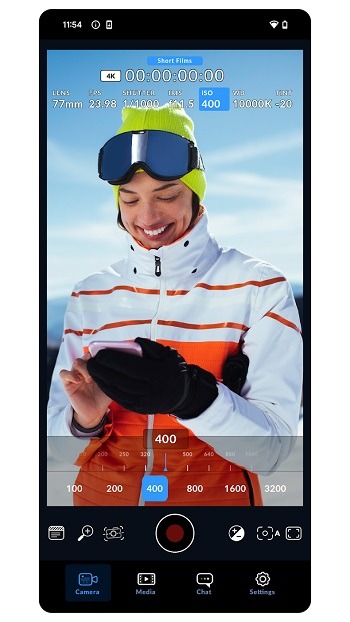
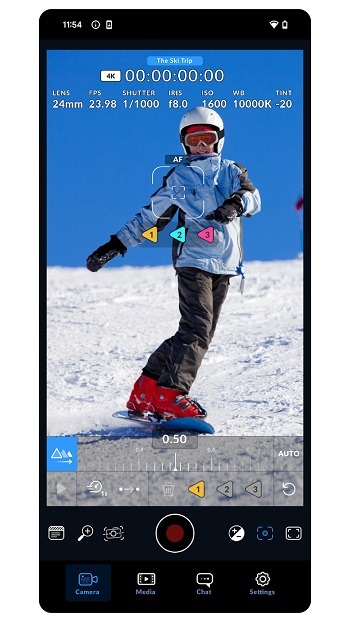
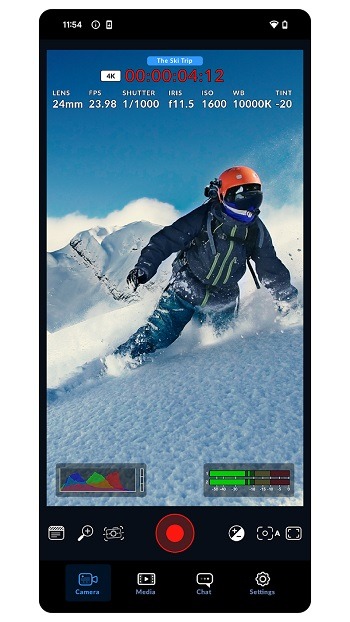
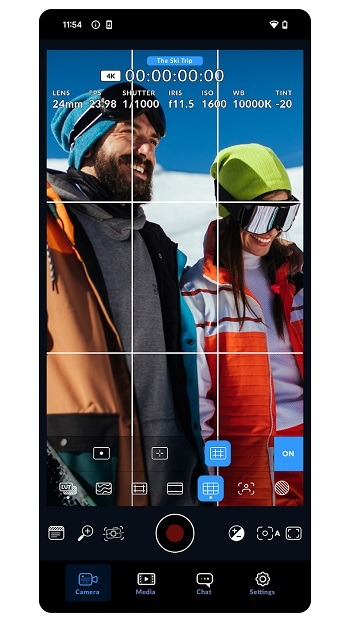
Blackmagic Camera is a professional-grade camera app for Android devices that offers mobile users advanced shooting controls, enabling them to capture exceptional photos with their smartphones. The app features a HUD interface that allows for quick adjustments to various shooting parameters; this layout remains visible during filming, minimizing the need for constant menu navigation. Additionally, the app includes a cloud service that allows multiple editors to view your footage simultaneously, facilitating seamless backend processing and significantly enhancing team collaboration.
Features:
Interactive HUD with pro controls
Blackmagic Camera presents an on-screen heads-up display for quick access to frame rate, shutter angle, ISO, and white balance. You can monitor exposure with histogram, zebra, and false color, and check focus with focus assist. Audio meters help you set clean levels during recording. This layout keeps critical settings visible while you shoot, which reduces menu diving.
Direct to cloud collaboration
Blackmagic Camera connects to Blackmagic Cloud so editors using DaVinci Resolve can see your clips appear during recording. You can record originals and HD proxies and let the app auto-upload in the background. Live proxy upload and in-app chat keep everyone aligned during fast news or social coverage. This flow helps teams make early edit decisions while the shoot continues.
Remote multicam and timecode sync
For multi-camera jobs, you can control several phones over Wi Fi and view them in a simple multiview. Start and stop all devices from one place, and lock timecode over Bluetooth with compatible boxes such as Tentacle Sync for clean alignment. In post, the matching timecode helps Resolve features like Sync Bin organize angles quickly. This setup supports concerts, interviews, and run-and-gun crews.
Monitoring, formats, and looks
Blackmagic Camera records in H.264 or H.265 and supports 3D LUT preview for a consistent on set look. If needed, you can bake a LUT into the file or keep it only for monitoring. On supported models, you can capture in a log profile, enable anamorphic de squeeze, turn on image stabilization, and use rack focus. Feature availability depends on your device, so options may vary by model.
Framing, media control, and accessories
You can frame for horizontal or vertical delivery using guides for 16:9, 9:16, 1:1, 4:5, and cinema ratios. The clip manager lets you review takes, choose what to upload, or record directly into an existing Resolve project. External microphones and headphones are supported for better sound and monitoring. You can also enter detailed metadata so shots stay organized in post.
Highlights:
Intuitive, Professional Interface Design
The app boasts a clean and intuitive interface that mimics the controls found on professional cinema cameras. This familiar layout makes it easy for experienced filmmakers to jump right in, while also providing a user-friendly learning curve for beginners. All essential settings are readily accessible, allowing you to make quick adjustments on the fly.
Record in Industry Standard Codecs
Capture your footage in high-quality video formats like ProRes or H.264, ensuring compatibility with professional editing software. These codecs offer superior image quality and color accuracy, allowing you to maintain the integrity of your footage throughout the post-production process. This ensures your videos look their best on any platform.
Advanced Monitoring Tools at Your Fingertips
Utilize built-in monitoring tools like waveform, histogram, and focus peaking to ensure your shots are perfectly exposed and in focus. These tools provide real-time feedback on your image, helping you to avoid common shooting mistakes and capture technically sound footage. Achieve professional results with confidence.
Pros and Cons:
Pros
Comprehensive remote control capabilities
User-friendly interface
Real-time monitoring and control
Timecode synchronization
Cons
Performance can be affected by network connectivity
FAQs:
What is Blackmagic Camera APK?
Blackmagic Camera APK is a mobile video app designed for Android users who want manual shooting controls, better monitoring tools, and a more professional filming setup.
What is Blackmagic Camera APK used for?
It is used for recording video with settings like frame rate, ISO, shutter angle, white balance, focus, and audio monitoring, which helps create more consistent footage.
Does Blackmagic Camera APK support manual controls?
Yes. The app is built around manual video control, so users can adjust key camera settings instead of relying on automatic processing.
Is Blackmagic Camera APK good for beginners?
It can work for beginners who want to learn manual video, but the interface and camera terms may take a little time to get used to at first.
Who should use Blackmagic Camera APK?
It suits content creators, filmmakers, film students, mobile videographers, and small production teams who want more control from a phone camera.
Conclusion:
Download the Blackmagic Camera APK for Android and take highly professional photos from your smartphone. By logging into the tool you can also connect with photography enthusiasts from all over the world via chat. The app fits filmmakers, content creators, students, and small teams who want a serious mobile video tool and do not mind spending a little time learning the controls.
-
Latest Updates
-
Featured Apps