WiFi AR
Tools
2026-10-23
11.19MB
5.17
Android 8.0 and up
390
Screenshots
Introduction
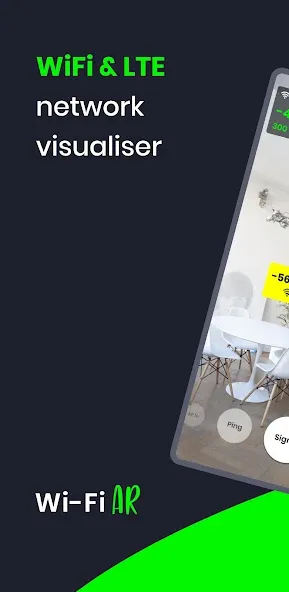
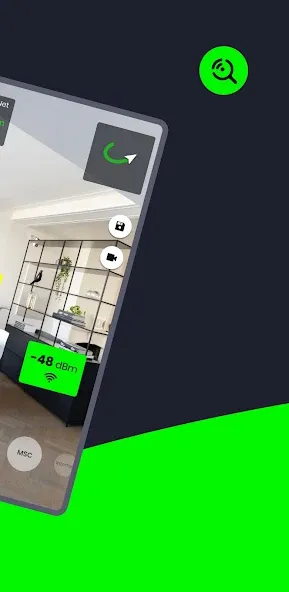
WiFi AR is a powerful Wi-Fi tool that leverages augmented reality (AR) technology to help users improve their network performance. By using the device's camera, the app visualizes the coverage of Wi-Fi and 5G networks, enabling users to identify the optimal access point for a smoother, more seamless online experience. Additionally, the app can detect network interference, pinpoint its sources, and provide actionable recommendations. With its user-friendly interface, it presents all information in a clear, visual format, making it easy for even non-technical users to navigate and utilize.
Features:
Augmented Reality Network Visualization
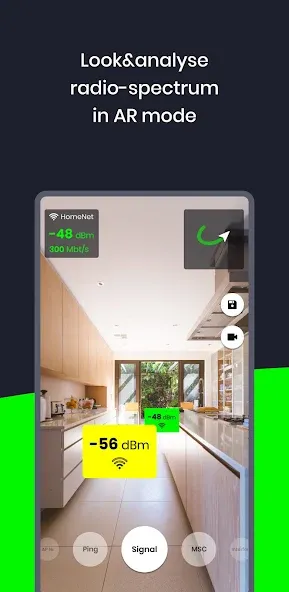
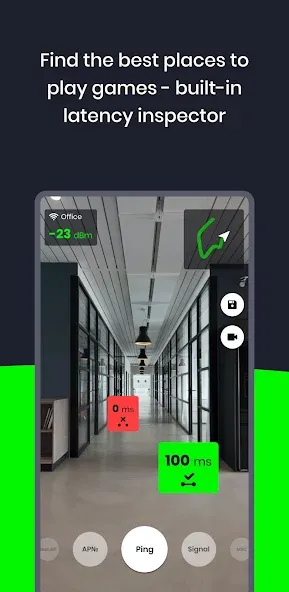
The app’s core functionality allows you to visualize your Wi-Fi, 5G, and LTE networks in AR mode. This means you can use your device’s camera to see signal levels, helping you locate the best position for a Wi-Fi access point (AP). Beyond signal strength, it also displays your current connection speed, providing an immediate understanding of bandwidth. For those who play online games, the app can identify areas with the lowest latency (ping value) in your space, which is crucial for achieving a smoother gaming experience.
Detecting Network Interference
WiFi AR can assist in diagnosing connection quality issues by identifying interfering networks. It helps you find neighboring Wi-Fi networks that might be impacting and reducing the quality of your own connection. If such interference is detected, the app implies that you might consider adjusting your router settings to select an alternative channel to minimize this impact.
Monitoring Access Point Switching
For environments with multiple Wi-Fi routers, the app offers a practical tool to ensure seamless connectivity. It allows you to check if your device is correctly switching between different access points as you move around. This feature is useful for verifying that your network setup is functioning as intended, preventing situations where your device might cling to a weaker signal from a distant router.
ARCore Requirement
To utilize the augmented reality features of WiFi AR, your device must support Google’s ARCore platform. The application will prompt you to download ARCore if it’s not already installed. It’s important to note that not all devices are compatible with ARCore; a comprehensive list of supported devices is available on the Google Developers website.
Highlights:
Authentic Signal Levels: This app reads Wifi signal, Speed, Ping, Interferences, Wifi network types and wifi location accurately. The signal, Speed and Ping levels go up and down as you move near or away from Wifi Network.
Precise Maps: To use a map, you have to give permission to use GPS service to use this app. The location of Wifi is accurate and recorded in google Maps.
Better Signal Strength: The signal of Wifi shows how strong the network is and helps you find the location of the network. WiFi AR precisely detects the signal strength and helps you get high-quality data.
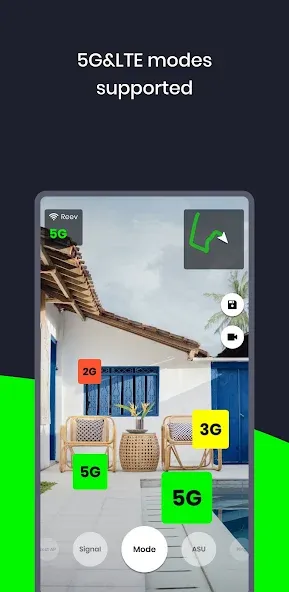
Best WiFi Signal Detection: WIth AR in the app, you can easily detect the signal. Besides the signal, it also shows the cell index, AP index, Ping and mode of Wifi. WiFi AR detects the best wifi signal to use the internet at high speed.
Supports 5G and LTE modes: If you want to search cellular Wifi Network, you must change the wifi mode to 5G/LTE mode. It accurately finds the best 5G and LTE networks around you. This app also signifies whether the network is 5G or from LTE (3g or 4G) based internet.
Visualize the network: You can visualize the direction of the signal with this app. It shows the map with your camera and signal strengths on the screen to understand the location of the signal.
Usage:
Open the app and allow camera and location permissions. Android requires fine location for WiFi scans because access points can reveal approximate location details.
Select a metric such as signal strength, speed, or latency. Then start the capture so the AR overlay begins filling in tiles as you move.
Walk slowly through each room and hallway while keeping the phone at a steady height. Watch the map build in real time and pause briefly in spots where readings vary.
Switch metrics to compare results, especially in multi AP networks where roaming matters. In dense apartments, check channels for interference, and for mobile gaming look for the lowest latency zones.
Review the completed heatmap and note weak areas or clean channels. Adjust router placement or AP handoff, then save a preview or video and share with support if needed.
FAQs:
Q: What is the primary purpose of the app?
A: It helps users visualize their WiFi, LTE, or 5G coverage in augmented reality, improving network optimization and performance.
Q: Can the app work with 5G networks?
A: It supports 5G networks, WiFi, and LTE.
Q: How does the app display network information?
A: The app uses augmented reality to overlay network data onto your physical environment, making it easy to visualize signal strength and quality.
Q: Is the app free to use?
A: Yes, the app is available as a free download.
Q: What Android version is required for the app?
A: It functions correctly for Android 8.0 (Nougat) or higher.
Conclusion:
Key features include the ability to find the optimal location for WiFi access points by analyzing signal strength, measuring current connection speeds, and determining ping values for smoother online gaming. Additionally, WiFi AR helps users identify neighboring networks that may interfere with their connection quality, allowing them to adjust router settings to minimize disruptions. Overall, this application serves as an essential tool for anyone looking to improve their WiFi connectivity.
-
Latest Updates
-
Featured Apps