Video Downloader
Entertainment
2026-10-08
49.36MB
2.7.3
Android
278
Related Apps



Screenshots




Introduction
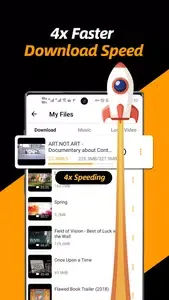
Video Downloader is a powerful tool that enables users to download a wide range of videos, music, and images from the internet. It is incredibly easy to use: simply open the app, enter a URL, and the application will automatically detect available videos—then, just tap the download button to start the process. It offers impressive download speeds and supports multi-threaded transfer, significantly accelerating download times. Additionally, downloads can run in the background, allowing users to attend to other tasks while the files download. With broad file format support, the app meets the vast majority of users' downloading needs.
Features:
Quick start and detection
Open the app home and enter a site address.
The browser identifies available videos.
Tap the download button to begin.
Flexible and faster downloads
Next, Video Downloader supports multi thread transfers to improve speed. You can fetch several files at once and continue in the background, even when you switch apps. Resolution options help you pick smaller sizes to save space or HD for better quality. This balances storage use and data costs.
Built in file manager
Also, you can pause, resume, or remove tasks when needed. After saving, rename files, play them inside the app, share them, or delete old items. Store selected items in a private folder with a password to keep sensitive media secure. This keeps personal clips away from others who use your phone. Use downloads responsibly and get permission before reposting; YouTube downloads are not supported.
Playback and audio conversion
Additionally, the integrated player handles common formats. Adjust playback speed or repeat a clip for review. If required, convert a video to audio and keep only the sound. Conversion helps when you only need music or voice notes.
Highlights:
High quality videos: 4K, 2K, 1080p, 720p
Full-featured download manager to pause, resume and remove downloads
Download several files at the same time
Download videos in the background
SD card supported
Resume failed downloads
HD video download supported
Large file download supported
Play videos offline with the built-in player
Pros and Cons:
Pros
Supports multiple formats
Supports HD video downloads
Offers fast download speeds
User-friendly interface
Cons
Requires permission and access to the network
Conclusion:
Overall, Video Downloader is a passable app for downloading videos, music, and pictures. It has features that make it stand out, such as the powerful download manager, the ability to preview videos before downloading, and the support for large file downloads. The option to store downloaded videos in a password-protected folder adds to its appeal.
-
Latest Updates
-
Featured Apps