NetMonster
Tools
2026-10-26
15.74MB
5.0.2
Android
78
Screenshots
Introduction
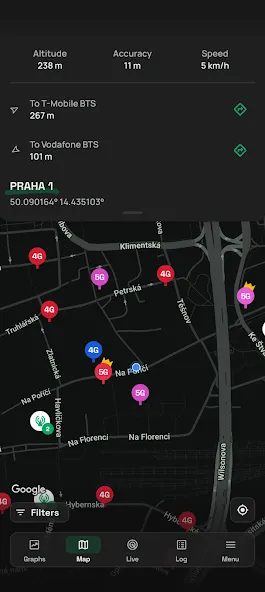
NetMonster is an Android application designed to help users collect and store information about nearby base stations, while also facilitating quick connections to servers. It features a user-friendly interface, allowing new users to get started with ease. Users can manually calibrate their location, view various base stations on a map, and use filters to find specific matches. The app offers excellent compatibility, running smoothly even on older Android devices. It supports various network formats and internet connection types. Furthermore, the app receives regular updates that introduce new features, ensuring optimal signal reception quality and connection speeds.
Features:
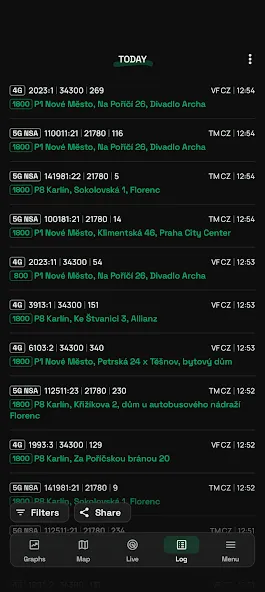
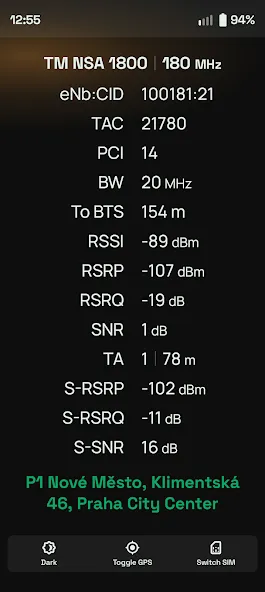
Real-time Monitoring: View data for serving and neighboring cells, including CID, LAC/TAC, eNB/gNB ID, PCI/PSC, ARFCN, and frequency bands.
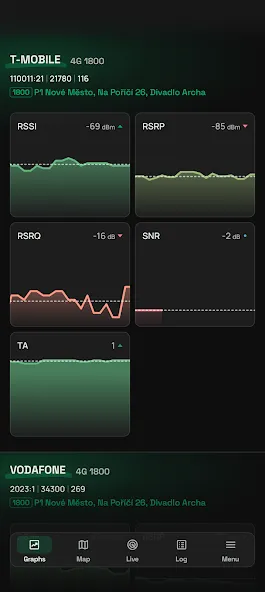
Signal Quality Analysis: Track RF metrics (RSSI, RSRP, RSRQ, SINR, CQI) with real-time visual indicators and explanations on how these measurements affect coverage and theoretical maximum speeds.
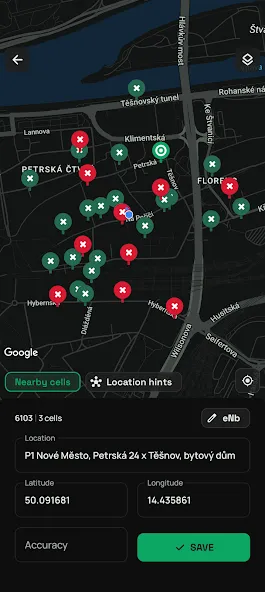
Cell Mapping and Logging: Continuously log connected cells during a session. Explore mapped locations, filter cells, manually correct base station locations, and export your data.
Carrier Aggregation and 5G: Detect LTE-Advanced carrier aggregation (CA) and monitor 5G NSA versus 5G SA status—including active transmissions, deployment signaling, and 4G+5G NSA aggregation.
Highlights:
Signal Strength: Displays the current signal strength of your mobile network in real time. This allows users to gauge connection strength and determine whether they need to move to a different location for better signal reception.
Network Type: The app shows the type of network your device is currently connected to (2G, 3G, 4G, or 5G). This information is essential for understanding your network performance and ensuring you are achieving the best possible connection speeds.
Cell ID: Provides the Cell ID of the base station to which your device is connected. This is useful for troubleshooting network issues and locating nearby base stations that may offer better signal reception.
Data Speed: Users can view the data speeds of their current network connection, including both download and upload speeds. This helps in assessing network performance and verifying that you are receiving the speeds you are paying for.
Network Coverage: Offers a detailed map of network coverage in your area. This helps you identify zones with poor coverage and find the best locations for making calls or using mobile data.
Data Usage: The app enables users to monitor their data usage in real time, helping them avoid exceeding data limits and incurring additional charges.
Signal Variations: The app visualizes fluctuations in signal strength and provides a brief explanation of what specific measurements mean, as well as how they affect reception quality or theoretical maximum speeds.
FAQS:
What is NetMonster?
A mobile application that provides detailed information about nearby mobile networks and cellular signal strength.
What features does NetMonster offer?
It offers features such as network type identification, signal strength visualization, data monitoring, and base station information.
Does NetMonster support international use?
Yes, it can be used anywhere in the world where mobile networks are available.
Advantages and disadvantages:
Pros
Customizable widgets
User-friendly interface
Power-saving
Cons
Features vary by version
Conclusion:
With features such as location calibration, map-based base station browsing, filtering, and the ability to export all collected data, NetMonster is an essential tool for users looking to monitor and optimize their network connections.
-
Latest Updates
-
Featured Apps