CrookCatcher
Tools
2026-10-08
26.11MB
3.0.35
Android
102
Screenshots
Introduction
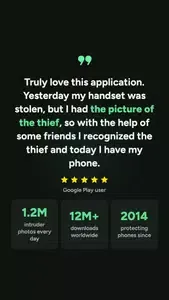
CrookCatcher is a powerful utility that enhances phone security and offers peace of mind against loss. It captures a photo of an intruder whenever an incorrect password is entered and emails the image along with GPS coordinates to the user. Designed to be lightweight and compact, the app remains inactive during normal use and only triggers upon a failed password attempt, resulting in minimal battery consumption. Additionally, it can capture photos and record location data offline, transmitting the information to the user as soon as an internet connection becomes available.
Features:
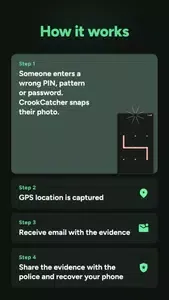
Intruder selfie on wrong PIN, password, or pattern
GPS location and estimated address of the attempt
Instant email alerts with photos
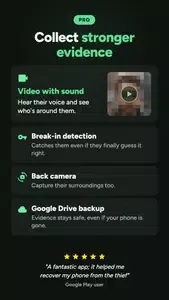
Catch them even if they guess your password after failed attempts (PRO)
Highlights:
Intruder image capture
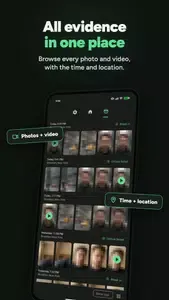
One of CrookCatcher's main features is its ability to capture images of anyone who unsuccessfully attempts to unlock the mobile device. If a would-be intruder enters an incorrect pattern, PIN, or password, the device's front camera will automatically take a picture. This photo will be saved in the app and emailed to the device's owner, providing a clear picture of the person attempting to gain unauthorized access.
Real-time GPS tracking
In addition to capturing images of the intruder, CrookCatcher also collects real-time GPS location data. The app will send the device's exact location via email, along with the photo. This will help you track your stolen or lost device, and in some cases, this information will be provided to the authorities so they can recover your phone. The GPS function is highly accurate and updated every time there is an unsuccessful attempt to unlock the device.
Immediate email notifications
Whenever there is an unauthorized attempt to access the device, CrookCatcher will immediately notify the device's owner. The email will include a photo of the intruder and the location of the device, enabling quick action in case of loss or theft. This is essential to alert users about real-time unauthorized access attempts without manually checking the app.
Pros and Cons:
Pros
Captures intruder photos after wrong PIN, password, or pattern attempts
Sends email alerts that include a picture, GPS coordinates, and estimated address
Free version provides the core protection features
Pro upgrade adds video with sound, rear-camera support, and Google Drive uploads
Cons
Experimental shutdown and quick-settings protection may not function consistently across phones
Does not react to fingerprint errors or work with pop-up selfie cameras
FAQs:
Q: Does it work without an internet connection?
A: It can capture photos and location data offline, but email alerts and cloud uploads require an internet connection to send or upload the evidence.
Q: Will the app drain my battery?
A: No, the app is inactive primarily and only triggers when wrong unlock attempts occur, so normal battery impact is minimal.
Q: Can thieves uninstall this app?
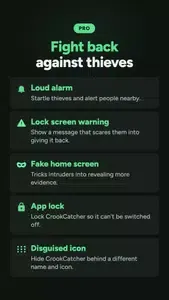
A: It offers options to hide its icon and require a pattern to open the app, which makes it harder for a thief to find and remove it. However, a determined thief with physical access may still uninstall it if they can access settings or reboot the phone.
Q: Is video capture available in the free version?
A: Video with sound and some advanced features are part of the PRO upgrade; basic photo capture, GPS tagging, and email alerts are available for free.
Q: Is the power menu blocking feature reliable on all devices?
A: That feature uses accessibility permissions to try to prevent shutdown/quick settings on the lock screen, but it is experimental and may not work on every Android model or software version.
Q: How do I get alerts if the intruder changes my SIM or removes the SIM?
A: Email alerts depend on network connectivity. If the intruder removes the SIM or disables connectivity, logged photos and location will still be saved locally and can be uploaded later when the device reconnects or accessed via auto-upload to Google Drive.
Conclusion:
If you are curious, the free version is a reasonable way to test how CrookCatcher behaves on your particular device and Android version. If it proves consistent for you, the Pro add-ons such as video capture, cloud backup, and disguise options can make it a powerful companion against nosey coworkers, roommates, or opportunistic thieves.
-
Latest Updates
-
Featured Apps