Auto Clicker: Auto Tapper
Tools
2026-10-12
9.28MB
1.3.3
Android
517
Screenshots



Introduction
Auto Clicker: Auto Tapper is an automatic clicking tool for Android devices that frees up your hands by handling repetitive screen taps. The app features a user-friendly interface and makes setting up automation scripts incredibly simple; users can easily configure multiple click points or swipe actions. It also supports saving, importing, and exporting scripts, allowing users to utilize or share their automation setups. Furthermore, the app operates without requiring special permissions, so users can use it with confidence, free from security concerns.
Features:
User : friendly interface, easy to use
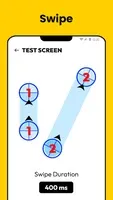
Add click or swipes : You can easily add and resume multiple clicks points or swipes routes
Customize scripts : Save, import and export automatic scripts as you like
Safe data storage : Sync your scripts data simply and safely with cloud storage
Support multiple situations : Testing screens, reading novels, etc.
Highlights:
Customizable Automation for Every Need
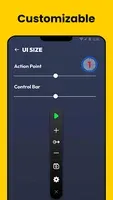
With its intuitive interface, the app offers flexible options to create, save, and manage automated task scripts. You can add and adjust multiple click points or swipe paths seamlessly, tailored to your specific requirements. Scripts can be easily exported, imported, and synchronized securely, ensuring a smooth and safe user experience.
Convenient and Accessible Features
A floating control panel enables quick adjustments, making it simple to modify or switch between scripts in real time. The app is compatible with Android 7.0 or later and uses the Accessibility Service API to deliver its automation capabilities. It provides a practical and efficient solution for users who need to perform frequent actions on their devices.
Tips and Tricks:
Open the app and follow the prompts to enable Accessibility Service and the display over other apps permission.
Select a mode and place tap points or draw swipe paths on the screen that match your task.
Set the timing for each action by adjusting intervals, delays, press duration, and repeat counts or a session timer.
Start automation from the floating control panel while viewing the target app, then pause to adjust if anything looks off.
Save the routine as a script with a clear name, export a backup, and recheck alignment if your display settings change.
FAQs:
Q: Does the app require root access?
A: No, it does not require root access to function.
Q: Is my data safe with this app?
A: The app does not collect private data and securely syncs your scripts with cloud storage.
Q: Can I customize my scripts?
A: Yes, you can save, import, and export your custom scripts according to your preferences.
Q: Why does the app use Accessibility Service?
A: The app uses Accessibility Service to implement its core features, such as simulating auto clicks and swipes.
Conclusion:
Overall, Auto Clicker: Auto Tapper is a useful utility app for Android users looking to automate clicking tasks with precise timing. Its easy-to-use interface and customizable settings make it a convenient tool for various purposes. Auto Clicker: Auto Tapper eliminates the repetitive strain of manual interactions, offering a reliable tool for enhancing productivity and optimizing device usage.
-
Latest Updates
-
Featured Apps