
PixVerse AI
Entertainment
2026-09-03
177.35MB
3.20.4
Android 7.0 and up
365
Screenshots
Introduction
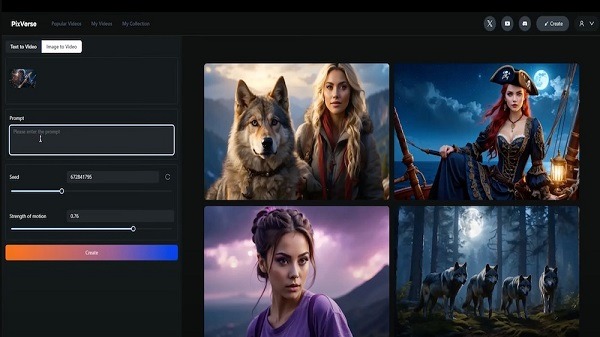
PixVerse AI is a powerful video editing software. Leveraging its powerful AI capabilities, this application allows users to generate a complete video using text prompts or images. Utilizing an advanced engine, the generated visuals are remarkably beautiful and realistic. The application also provides users with editing controls, allowing them to modify keyframes of their videos. It offers a variety of templates, covering various categories and popular effects. Users can directly select a template and preview the result. Furthermore, users can use prompts to allow the AI to help them modify the video to suit their vision.
Features:
Text to Video and Image to Video
PixVerse AI generates clips from a typed prompt or an uploaded image with realistic motion and cinematic quality. It applies advanced physics to animate subjects, clothing, hair, and camera movement for lifelike results. This helps turn static ideas into short videos that fit everyday sharing without manual keyframing.
Modify, Key Frame Control, and Video Extension
PixVerse AI provides edit controls that respond to plain language. You can modify a draft by updating the prompt, set key frames to lock poses or camera changes, and extend a shot to keep continuity. Together these tools support small corrections and longer scenes without starting over, which saves time across multiple versions.
Fusion Mode and reference generation
PixVerse AI blends up to three images into a single coherent clip using Fusion Mode. You can also guide consistency by supplying a reference so characters and style stay aligned across shots. This works well for lookbooks, product demos, or character reels where visual identity matters.
Templates and named effects
PixVerse AI includes template categories with viral effects such as AI Kiss, AI Hug, AI Dance, AI Muscle, AI Fighting, AI Jesus Hug, Old Photo Revival, Magic Transformation, and AI Beauty and Skin Tone. You choose a template, preview the result, and adjust prompts or images to suit your idea. This approach speeds up common social formats while keeping room for quick tweaks.
Cross platform access and onboarding
PixVerse AI works on the web and Android, so projects are accessible when you move between devices. New users receive free sign up credits with a daily refresh to test workflows before committing, and optional memberships unlock longer or more frequent generations. Brands and advanced users can request API access for integrations, while a simple PixVerse login keeps your content in sync. If needed, you can download PixVerse on an Android phone to keep creation mobile.
Highlights:
Rendering time: Most videos finish in ~5 seconds.
Resolution: Full HD 1080p export ensures clarity.
Cloud-powered: GPU servers handle the heavy lifting so your phone doesn’t lag.
No Watermark: Share videos without distracting logos.
Ad-Free: Stay focused on your workflow without interruptions.
Unlocked Premium Effects: Access every template and trend from day one.
Unlimited Usage: Forget daily credits—create as much as you like.
Tips and Tricks:
Experiment with Features: Don’t be afraid to try out different tools and effects. The more you experiment, the better your videos will become.
Stay Updated: Make sure to update the app regularly to enjoy new features and improvements.
Plan Your Videos: Before you start, have a clear idea of what you want your video to look like. This will make the creation process smoother.
FAQs:
What is PixVerse AI?
PixVerse AI is a mobile app that uses AI to create videos from text, images, or characters, ideal for content creators who want quick, quality output.
Is PixVerse AI free to use?
There is a free version with basic tools, but it includes watermarks and some limitations. Full access requires a subscription.
Can PixVerse AI run on iPhone?
Currently, PixVerse AI APK is designed for Android. iPhone users would need to wait for an iOS version or use a compatible alternative.
What makes PixVerse AI useful for creators?
It simplifies video creation with automated text-to-video conversion, animated visuals, reusable characters, and quick upscaling to 4K.
Who should use PixVerse AI?
PixVerse AI is great for marketers, influencers, and anyone who wants to create dynamic, engaging videos quickly without traditional editing software.
Conclusion:
PixVerse AI is a revolutionary AI video generator that makes video creation simple and enjoyable. This app provides the tools to transform photos into videos, experiment with AI effects, or create artistic animations. With its user-friendly interface and powerful AI technology, anyone can produce stunning video content effortlessly.
-
Latest Updates
-
Featured Apps









