
Edits
Entertainment
2026-09-06
106.82MB
423.1.0.49.66
Android 9 and up
278
Screenshots




Introduction
Edits is a video editing tool specifically designed for Instagram. It helps users enhance their video content. The app features precise single-frame editing, allowing for accurate video control. It also provides a rich selection of templates for fonts, sound effects, and filters, allowing users to use them directly and save significant time. Furthermore, it offers numerous customization options, allowing users to create their own subtitles and choose their colors. This app integrates the latest AI technology, enabling quick addition of animation effects to user images, making your videos even more outstanding.
Features:
Perform precise edits at the single-frame level for meticulous control.
Adjust camera settings including resolution, frame rate, and dynamic range; benefit from enhanced flash and zoom functionalities.
Animate images via AI-powered features to add dynamic elements to your videos.
Edit backgrounds using green screen techniques, cutout options, or overlay additional videos.
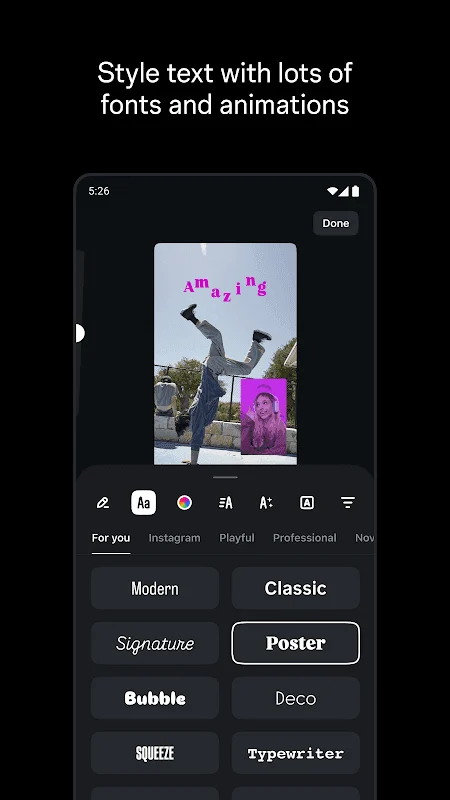
Select from a broad array of fonts, sound effects, voice effects, filters, stickers, and other visual enhancements.
Refine audio quality by amplifying voices and reducing background noise for clearer sound.
Create and customize captions automatically to enhance accessibility and engagement.
Highlights:
Record higher-quality videos
When you install Edits, you'll find a section where you can take advantage of this tool's potential to make higher-quality recordings. After granting camera permissions to this tool, whenever you use it, you'll see a minimalist recording window that's ideal for capturing any moment with maximum definition.
Access metrics and share your videos instantly
In Edits, you'll also find a section where you can view the metrics and statistics of the videos you share on Instagram. This way, you can analyze these trends without having to visit the social media platform's creators section. This feature is very useful, especially if you're a content creator.
Pros and Cons:
Pros
Powerful AI-driven video creating and editing tool
Integrated with Instagram
Simple to use interface
Support real-time collaboration
Offers ready-made templates
Huge collection of text styles with a combination of fonts, colors.
Free to use
Cons
Reliable only for Instagram creators
Advanced tools are limited
FAQs:
What makes Edits different from other editing apps?
Edits is specifically tailored for Instagram content, offering a streamlined workflow and features designed to maximize engagement on the platform. Its focus on precision and ease of use sets it apart.
Is Edits suitable for both beginners and experienced users?
Yes, Edits features an intuitive interface that’s easy for beginners to learn, while also offering advanced tools and customization options for experienced users who demand more control.
Does Edits require a subscription or is it a one-time purchase?
Edits offers both a free version with basic features and a premium subscription that unlocks advanced tools and removes limitations. This allows users to choose the option that best suits their needs.
Conclusion:
Edits, an Instagram app provides a user-friendly editing platform for anyone looking to enhance their video content. While it may not be the best fit for those who rely on more advanced desktop editing software, its intuitive design, AI-powered tools, and real-time analytics make it a must-have for Instagram creators.
-
Latest Updates
-
Featured Apps









