
AutoCap
Entertainment
2026-08-18
53.59MB
2.1.1
Android
331
Screenshots

Introduction
AutoCap is a tool for generating and adding subtitles to videos. Powered by advanced speech recognition technology, it accurately converts spoken audio into precise subtitles. The software supports multiple languages and features a simple, user-friendly design; simply start recording, and it automatically generates subtitles for you. It offers customization options, allowing you to adjust the appearance, font, color, and size of the text. Additionally, it works offline without an internet connection. Powerful yet easy to use, it ensures that the generated subtitles are perfectly synchronized with the audio on screen.
Features:
Advanced Speech Recognition and Caption Translation
AutoCap applies advanced voice recognition and natural language processing technologies to extract speech from videos, delivering accurate transcriptions in most cases. Users can select from a wide range of languages, making the app suitable for multilingual content or audiences. Automatic translation of captions is also available.
Manual Editing and Flexibility
To address occasional errors in automated transcription, AutoCap offers a straightforward editor for manual corrections before finalizing the captions. This is particularly useful for improving accuracy on technical language,
Animated Subtitle Styles and Customization
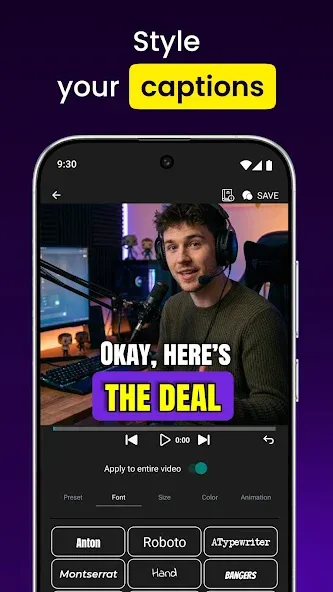
A distinguishing feature of AutoCap is the ability to animate captions, giving videos a visually appealing edge compared to static subtitles.
Highlights:
Automatic voice recognition transcription;
Captions can be customized with various fonts, colors, and animations;
Captions can be emphasized for dramatic effect;
Save videos in full MP4 quality;
Remove or customize watermark options;
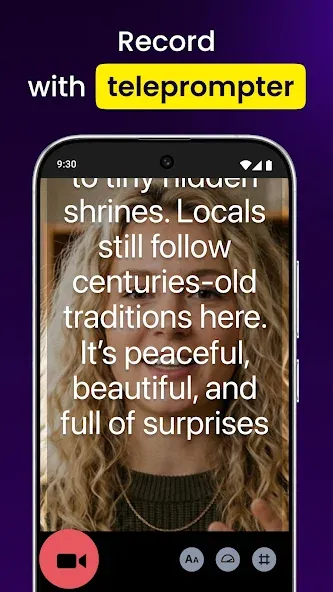
Works as a Teleprompter For Video;
Supports all Android video formats;
Easy editing of Auto Caption Generator results;
Perfect for selfie videos, presentations, and content creators;
Exporting videos keeps the original resolution unchanged.
FAQS:
How do I get AutoCap?
You can use AutoCap on your phone or computer. To start online, sign up in your browser.
Is AutoCap free to use?
AutoCap is free to download, and you can access some features without a subscription. To unlock all capabilities and get professional-quality videos, you’ll want to sign up for one of our paid plans.
What’s the best AI video editor for content creators?
The best AI video editor helps you create professional-quality content fast, without advanced editing skills—and that's exactly what AutoCap is built for.See how AutoCap works for your niche.
What types of videos can Captions edit?
You can edit a wide range of video types and formats, including vertical and horizontal video. AutoCap works well for social content, video ads, podcast clips, tutorials, product assets, and more.
Advantages and disadvantages:
Pros
Automatically creates captions for videos, making them more accessible to a wider audience.
Easy-to-use interface that allows users to quickly generate accurate and reliable video captions.
Captions can be edited manually or automatically with the app’s built-in editing tools.
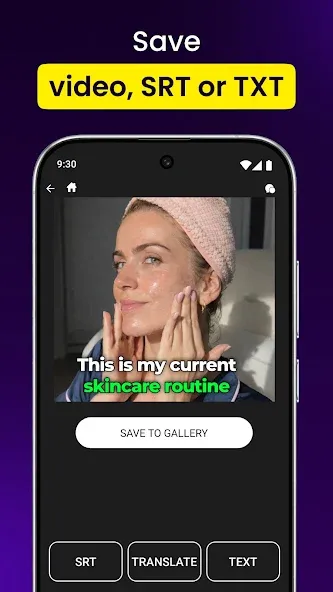
Can export caption files into multiple formats including SRT, VTT and TXT so they are compatible with different platforms such as YouTube, Facebook and Twitter etc.
Supports several languages including English, Spanish, French, German, Italian, Portuguese, Russian, Chinese, Japanese, Korean, Arabic And Hindi.
Cons
AutoCap does not allow users to edit captions or search for specific words.
It is limited in its ability to recognize different languages and accents, making it difficult for people with diverse backgrounds to use this app effectively.
Conclusion:
AutoCap is the perfect solution for anyone looking to add captions to their videos quickly and easily. With its advanced speech recognition technology and customization options, AutoCap makes it easy to create professional-quality subtitles for your video content. So why wait? Give AutoCap a try today and take the hassle out of adding captions to your videos!
-
Latest Updates
-
Featured Apps









