Carrier Services
Social
2026-10-26
9.23MB
carrierservices.
Android
316
Screenshots


Introduction
Carrier Services is an application designed to support carrier-related functions. It features a clean, intuitive interface that allows users to get started quickly and easily. The app facilitates communication through services such as SMS and MMS. It offers excellent compatibility, enabling seamless communication across different networks—connecting effortlessly regardless of the user's mobile carrier. It also helps improve battery life by enhancing energy efficiency, thereby extending the time between charges. Furthermore, the app prioritizes security, ensuring the protection of user privacy. It is compatible with a wide range of devices and receives regular updates to introduce new features, keeping pace with technological advancements and adding convenience to users' daily lives and work.
Function:
Enable RCS
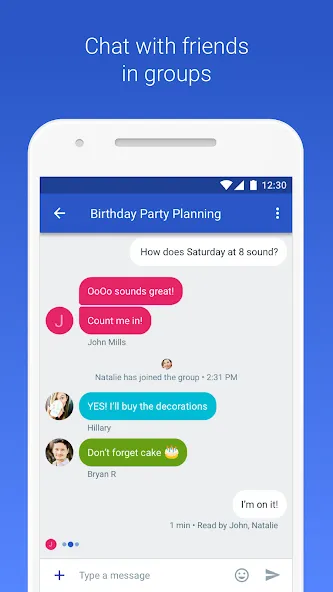
This tool offers excellent compatibility with Rich Communication Services (RCS), allowing you to enable RCS chat features for messaging apps on supported devices. This brings capabilities such as typing indicators, an enhanced group chat experience, read receipts, and high-quality media sharing to all the messaging apps installed on your device.
Optimize Battery Life
Designed for high energy efficiency, this app manages carrier signals and registrations in the background. Compared to older messaging protocols, it optimizes mobile communication while maintaining reliability, which helps reduce battery drain. It minimizes the need for manual intervention and helps maintain a stable connection over long periods, all while keeping power consumption low.
Block Spam
This innovative app includes a call-screening feature, allowing you to filter incoming calls. This powerful tool helps protect your security and privacy by making it easy to block spam or nuisance calls. Furthermore, it facilitates successful registration and ensures that messages are routed correctly when connected to carrier services like IMS and RCS.
Improved Messaging Features
By integrating RCS, this tool serves as an excellent alternative to traditional SMS, enabling advanced communication. It provides a full suite of features, including read receipts, high-definition media sharing, typing indicators, group chats, and much more. Integrated directly into your default messaging app, it significantly elevates your texting experience, much like other modern instant messaging platforms.
Enhanced Compatibility
The app offers broad compatibility across a wide range of Android devices, ensuring reliable performance regardless of which phone you use. It also provides compatibility updates that allow you to enjoy consistent features across multiple devices, while minimizing issues such as setup errors or connection failures. It is an essential utility for optimizing your device's performance.
Multi-Network Support
Supporting a variety of networks, this tool delivers a seamless user experience and facilitates communication across devices—regardless of your mobile carrier or Android device model. It is the ideal solution for connecting with others without being restricted to a specific network or device, fostering a more unified and consistent communication environment.
Highlights:
Enable RCS features for supported carriers.
When both your carrier and device support RCS, Carrier Services helps you enable RCS chat features within compatible messaging apps. You gain access to features such as typing indicators, read receipts, enhanced group chat capabilities, and high-quality media sharing (where available).
Connect your device to your carrier’s IMS and RCS systems.
This app connects your Android device to your carrier’s IMS (IP Multimedia Subsystem) and RCS (Rich Communication Services) systems, ensuring that messages are routed correctly and registration is successful. This bridging function improves cross-network setup and synchronization, keeping your phone number recognized so you can use advanced chat features.
Runs in the background with high reliability.
Carrier Services manages carrier signaling and registration in the background. It is designed to balance reliability with battery and data efficiency, allowing you to stay connected without requiring manual intervention.
Enhance compatibility across devices and regions.
Because carriers vary by market, Carrier Services provides compatibility updates to ensure that features work consistently across a wider range of devices. As networks evolve, these updates help reduce setup errors and connection failures.
Maintain stable messaging with diagnostic capabilities.
To fix bugs and prevent crashes, Carrier Services collects limited diagnostic information. This helps ensure smooth operation and improves the quality of supported messaging features over time.
FAQS:
What exactly are Carrier Services?
Carrier Services support advanced messaging features—such as RCS—that improve messaging reliability and optimize communication between your phone and your mobile carrier's network.
Does my phone need Carrier Services?
While you can still use your phone without Carrier Services, having them installed can significantly enhance your text messaging experience and unlock modern communication features.
Do Carrier Services collect my data?
Carrier Services process messaging data, but they do so in compliance with Google’s Privacy Policy. The primary focus is on facilitating communication, not on collecting personal information.
Advantages and disadvantages:
Pros
User-friendly
Fully featured
Regularly updated
Cons
Shortcomings
Conclusion:
Carrier Services improves communication between your smartphone and your mobile carrier. The app helps your smartphone synchronize properly with the carrier's network and enables various features, including voice and internet services. What are you waiting for? Download it now.
-
Latest Updates
-
Featured Apps